Delete Identical
Description: Removes duplicate records from a point or multipoint feature class. You can select one or more attribute fields and a geometry field as the duplicate criteria. For each group of duplicates, the tool keeps the first record encountered in the data source reading order and removes the remaining records.
Data Description
- Supports point and multipoint feature classes only.
- At least one attribute field or geometry field must be selected.
- When only attribute fields are selected, records are duplicates only when all selected field values are identical.
- When the geometry field is selected, point locations must satisfy the XY tolerance. For data with Z values, the Z tolerance must also be satisfied.
- Attribute fields and the geometry field can be combined; all selected conditions must be satisfied.
- The tool processes the entire input feature class. The current map or attribute-table selection does not limit processing.
Steps
- Go to Toolbox -> Vector Tools -> Cartography -> Delete Identical, and double-click to open the tool dialog.
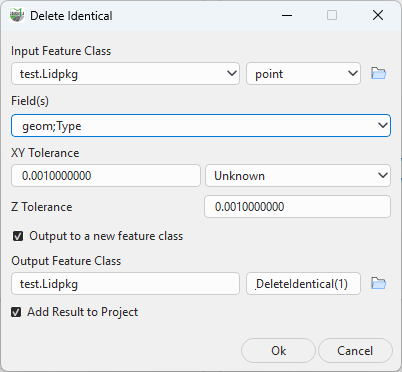
Delete Identical
- Select a point or multipoint input feature class.
- In Fields, select one or more duplicate criteria. If the geometry field is selected, set XY Tolerance and Z Tolerance.
- Output to a new feature class is enabled by default. Specify the Output Feature Class and, when needed, select Add Result to Project.
- Click OK to run the tool, then check the output record count and key attributes.
Parameter Description:
- Input Feature Class: The point or multipoint feature class to check.
- Field(s): Attribute or geometry fields used to determine whether records are identical. Multiple fields are combined; a duplicate is identified only when all selected conditions are satisfied.
- XY Tolerance: The allowed XY planar location difference when the geometry field participates in duplicate detection. The value must be greater than 0.
- Z Tolerance: The allowed Z-value difference for three-dimensional geometry. The value must be greater than 0. Z values are not used for two-dimensional data.
- Output to a new feature class: When enabled, the tool copies the input feature class and removes duplicates from the copy. When disabled, the tool modifies the input feature class directly.
- Output Feature Class: The cleaned output feature class. It is shown only when Output to a new feature class is enabled. It cannot be the same as the input or overwrite an existing target.
- Add Result to Project: Available when the output is a named feature class in the current project database. When selected, the successful result is added to the project automatically.
Result
The first record encountered in the data source reading order is retained for each duplicate group. The tool produces only the cleaned feature class, or modifies the input feature class directly. It does not produce a duplicate relationship table, deletion list, or duplicate-group statistics table.
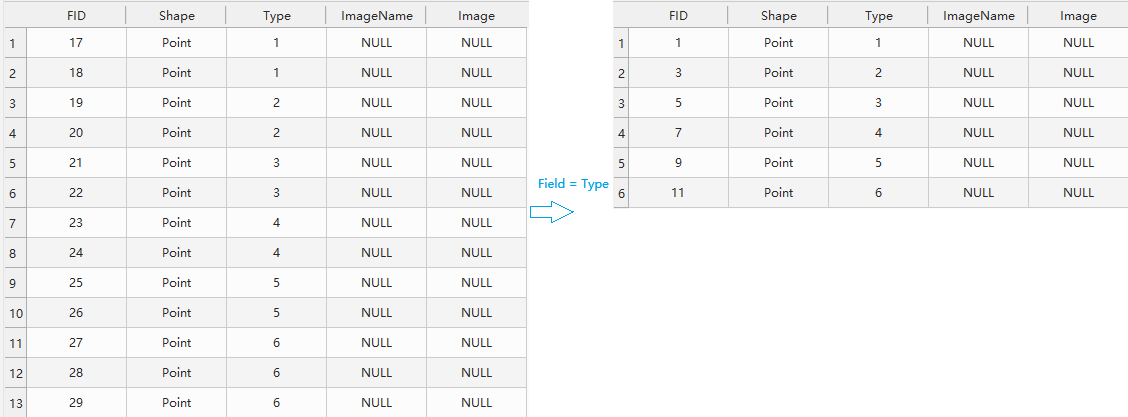
Delete Identical result
Notes
- Use Output to a new feature class first, and replace the original data only after the result has been checked.
- Create a verified backup before modifying the input feature class directly. The tool does not guarantee complete rollback after an in-place deletion failure.
- An excessively large tolerance can treat nearby but different objects as duplicates. Validate the tolerance with a small sample for non-metric projected or geographic-coordinate data.
- Empty geometries are skipped during geometry-based duplicate detection and are not considered identical to one another.
- Strings are compared as stored; case and leading or trailing spaces are not normalized automatically.
- To process only part of a dataset, export the target records to a separate feature class first.