Add Point Cloud Attributes by Table
Function Description: Associates the point cloud "TreeID" attribute with the tree seed point "Object ID" and writes selected field information to the additional attributes of the corresponding individual-tree point cloud.
Steps
1.Click Add Point Cloud Attributes by Table  from the Tools drop-down menu. The following dialog box appears:
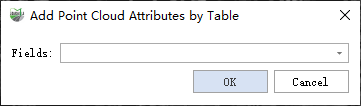
Add Point Cloud Attributes by Table
2.Select the fields to add and click OK.
Parameter Settings
- Fields: Selected fields are added to the point cloud additional attributes; unselected fields are not added.
- Addition Rules: Additional attributes do not support strings, so different rules apply to different field types.
- Non-text Fields: For short integer, long integer, float, and double fields, the added attribute name, type, and value remain consistent with the source field.
- Text Fields: The added attribute name is the field name followed by "ID", its type is short integer, and values start at 1. A field with the same "field name + ID" name is also added to the Tree layer.
| Fields | Additional Attributes | ||||
|---|---|---|---|---|---|
| Type | Name | Value | Type | Name | Value |
| Short Integer | Name | Value | Short Integer | Name | Value |
| Long Integer | Name | Value | Long Integer | Name | Value |
| Float | Name | Value | Float | Name | Value |
| Double | Name | Value | Double | Name | Value |
| Text | Name | Value | Short Integer | NameID | 1... (starting from 1) |
Addition Rules