LiSplat To PLY
Function Description: Converts LiSplat Gaussian model files to PLY format. Batch conversion of one or more files is supported.
Steps
- Click LiSplat To PLY
 to open the parameter settings dialog box.
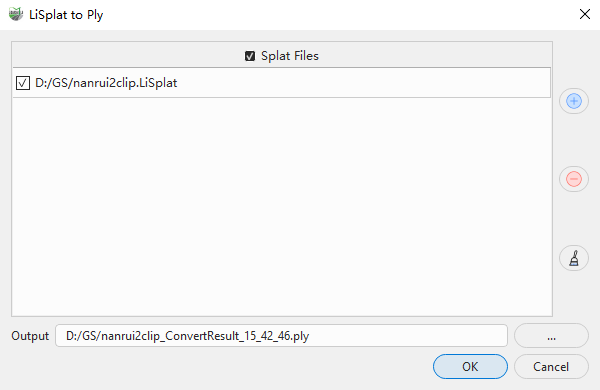
Add one or more LiSplat files to convert, and select the files to process in the file list.
Set the output path. When one input file is selected, you can specify the location and name of the output PLY file. When multiple input files are selected, the program generates a corresponding PLY file for each input file.
Click OK to start the format conversion.
Parameters
- Splat Files: Controls the selection state of the Gaussian splat files in the file list.
- File List: Displays the LiSplat files to convert. One or more files can be selected for batch conversion. Gaussian models already loaded in the current project are automatically added to the list.
- Add +: Adds LiSplat files to the file list.
- Remove -: Removes the selected files from the file list.
- Clear: Clears all data from the file list.
- Output: Sets the output path for the conversion results. By default, the system generates the result file name from the source file name and the current time. The output file extension is
.ply.
When a LiSplat file contains a skybox, the system also exports a PLY skybox file with the same result file name and the
_skyboxsuffix.