Merge Files
Steps
- Click
 Merge Files to open the Merge Gaussian Splat Files dialog box.
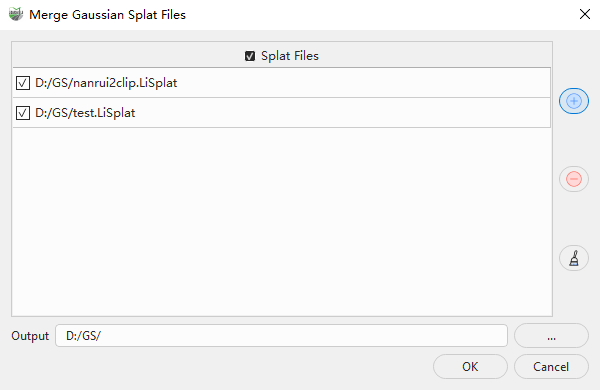
Add the LiSplat files to merge and select the files to process under Splat Files. At least two files must be selected.
Check the spatial positions of the input files. The models to be merged must not be too far apart; their spatial distance must be within the range supported by the function.
Set the output directory for the merged result in Output. Click the browse button ... to select a directory.
Click OK. The program merges the selected data and writes the result to the specified output directory. Click Cancel to close the dialog box without merging the files.
Parameters
- Splat Files: Controls the selection state of the Gaussian splat files in the file list.
- File List: Displays the LiSplat files to be merged. Only selected files participate in the merge.
- Add File +: Adds LiSplat files to the file list.
- Remove -: Removes the selected files from the file list.
- Clear: Clears all data from the file list.
- Output: Sets the output directory. Click ... to browse for a directory. After processing, the Gaussian data from all selected files is merged into one result dataset. Depending on the data volume, the result may be a LiSplat file or an LOD dataset.
Data Requirements: The Gaussian models to be merged must use the same coordinate reference system, and the spatial distance between them must not exceed the range supported by the function. If the models are too far apart, check their coordinate reference systems and model coordinates. If necessary, use Define Projection or Transform before merging.
The merge function does not automatically transform data between different coordinate reference systems. Before merging, ensure that all models use the same coordinate reference system and coordinate units.