Selection and Cutting
The selection, inside cut, outside cut, and cancel operations for Gaussian models are the same as those for point clouds. For detailed instructions, see Point Cloud Selection Tools.
Cut results for Gaussian models are saved differently from those for point clouds. The procedure is described below.
Save Cut Results
Function Description: Saves the cut result as a new Gaussian model file. LiSplat and PLY formats are supported.
Steps
- Use a selection tool to specify the area to process, and then perform an inside cut or outside cut to obtain the cut result to be saved.
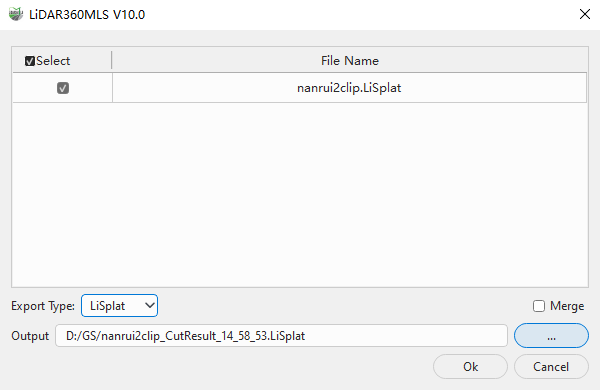
In the save settings dialog box, select the source Gaussian model data to include when saving the cut result.
Select the export type and output directory. The system generates a new cut result file based on the source file name and the current time.
Set Merge as required:
- Merge cleared (default): When multiple source Gaussian models are selected, each model is cut separately and saved as an independent result file.
- Merge selected: When multiple source Gaussian models are selected, the cut results of all models are merged and saved as one result file.
Click OK to save the cut result.