Measure Point Noise
Function Description: Used to measure "point-to-point" noise in a point cloud. It fits a plane to each point and its nearest neighbors, then calculates the average distance from all points to their fitted planes.
Steps
1.In the Toolbox, select Data Management >> Point Cloud Tools >> Measure Point Noise, or directly type Measure Point Noise in the search bar and double-click to open the interface as shown below:
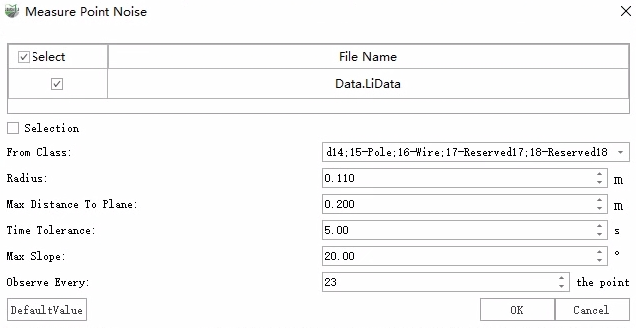
2.If you need to calculate local noise, check Selection to choose a local point cloud region. After setting the calculation parameters, click OK.
3.Once the calculation is complete, the results will be displayed in the log window.
Parameters
From Class: Specifies the point class used for noise calculation.
Radius: Defines a circular area around each point; points within this area are used for plane fitting.
Max Distance to Plane: Points whose distance to the fitted plane exceeds this value will be ignored.
Time Tolerance: Only considers points within the specified time difference. A smaller time tolerance ensures that only points from the same scan line are used, preventing mismatches between different scan paths from affecting the result.
Max Slope: Points with a slope greater than this value will be ignored.
Observe Every: Defines the point spacing used for noise calculation.