Import Seed Points
Function Description: Imports an external CSV or TXT seed point file and generates seed points in the "Tree" layer.
Steps
1.Click Import Seed Points  from the Tools drop-down menu, then select the seed point file.
2.Set the delimiter; specify the Object ID, X, Y, Z, DBH, and Height fields; set the number of lines to skip; and click Apply.
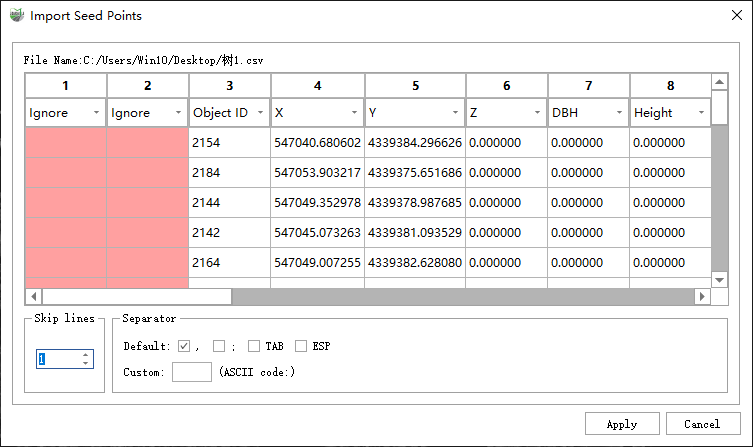
Import Seed Points
Parameter Settings
- Import Logic:
- Not Existing: If an imported seed point does not exist in the Tree layer, a new seed point is created.
- Existing: If an imported seed point already exists, its position, DBH, and height values are updated.
- Invalid: If the imported Object ID is invalid (less than or equal to 0), the software creates a valid Object ID before importing it.