Remove Duplicate Points
Function Description: Removes “duplicate points” in a point cloud by setting a minimum distance between points.
Steps
1.In the Toolbox, select Data Management >> Point Cloud Tools >> Remove Duplicate Points, or directly type Remove Duplicate Points in the search bar and double-click to open the interface as shown below:
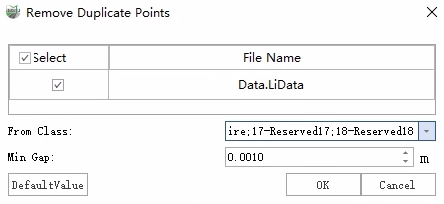
2.Set the source class and minimum spacing, then click OK.
Parameters
From Class: The point class to be used in the computation.
Minimum Gap: The minimum allowable distance between points. Points closer than this distance will be considered duplicates.