Export TIN
Function Description: Export a TIN generated from point clouds or vectors into common formats. Supported formats: OBJ, PLY.
Steps
- Click the Export TIN
 button.
 - A dialog will pop up:
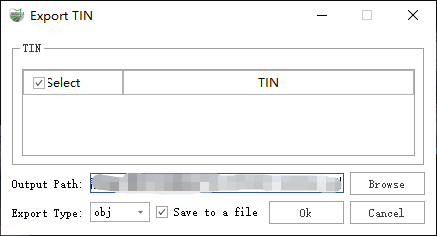
Dialog
Parameter Description:
TIN: The TINs currently loaded in the project.
Output Path: The location to save the TIN file.
Export Type: The format in which the TIN file will be saved.
OBJ
PLY
LandXML

Dialog
- Target Coordinate System/ Conversion Options: Used to configure the coordinate system for the output data.
- Coord Order: The output order of point coordinates. By default, point coordinates are output in the XYZ order.
Save to a File:
- Checked: All selected TINs will be saved into one file.
- Unchecked: Each selected TIN will be saved as an independent file.