Seed Editor
Steps
Click Seed Editor to activate the function.

1.Click Draw Seeds and select Single Mode or Interval Mode. Use To Ground, To DBH Center, and Height in the settings to control where seed points are generated and whether tree height is calculated.
- Single Mode: Generates one seed point at a time.
- Interval Mode: Generates multiple seed points at equal intervals. Click three points in sequence: the first two determine the interval, and the third determines the end position.
2.Select Horizontal Section, set the section position, extraction parameters, and snapping parameters, activate Circle Extract, Polygon Extract, or Rectangle Extract, and then select the point cloud in the 3D window for extraction.
- Points hidden in the 3D view do not participate in extraction.
- Normalizing the data in advance improves the efficiency of manual batch extraction.
3.Select Horizontal Section and click Global Extract to extract seed points from the entire section. Its parameters are the same as those used for batch seed point extraction.
4.Click To Ground and select the seed points that need to be snapped to the ground. The Ground class is used by default; if no ground points are available, the lowest point is used.
5.Click Move Seed , select a seed point, and drag it to a new position. Press Delete to delete the seed point.
6.Click Polygon Pick , draw a polygon, and select the seed points within it. Press Delete to delete the selected seed points.
7.Click Update . See Seed Updator for details.
8.Click Settings to display the settings window.
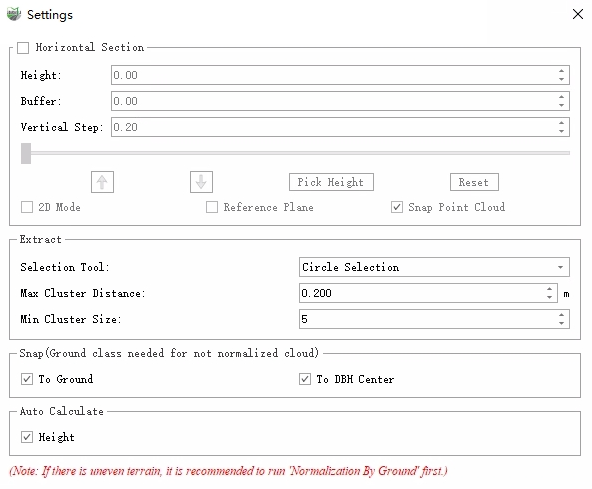
Settings
9.Click Exit to exit the toolbar.
Parameter Settings
- Extract: Used for batch extraction and global extraction.
- Max Cluster Distance: The maximum spacing used for point cloud clustering. Points separated by less than this value are clustered as one tree.
- Min Cluster Size: Trees whose clusters contain fewer points than this value are filtered out.
- Calculate and Snap: Controls whether the corresponding position or value is calculated after a seed point is generated. It is used by Draw Seeds, batch extraction, and global extraction.
- To Ground: For normalized data, sets the elevation to 0. For non-normalized data, calculates the intersection between the ground and the tree and uses its elevation as the seed point elevation.
- To DBH Center: Uses the point cloud at DBH height to calculate the DBH center and uses it as the planar coordinates of the seed point. See Settings for the DBH height setting.
- Height: Calculates the tree height at the seed point and writes it to the Height field. The calculation uses point clouds visible in the 3D view.
- Cylinder: Controls the preview cylinder used by Draw Seeds. The software uses points inside the cylinder to calculate height.
- Radius: The cylinder radius centered on the target snap point.
- Upper Height: The cylinder height above the target snap point.
- Lower Height: The cylinder height below the target snap point.
- Show Cylinder: Controls whether the cylinder is displayed.