Terrain Processing (Workflow-Based)
Function Description: Provides an integrated workflow to generate DEM/DSM and contour lines from point cloud data.
Input & Output
- Data Input
- Point Cloud Data: Imports all point clouds from the current project. It is recommended to use classified point clouds—DEM can be generated using only ground points, while DSM will be generated if all points are used.
- Result Output
- DEM/DSM: GeoTIFF files generated from point cloud data.
- Contour Vector: Contour line layer written into the Lidpkg file currently opened at the root node.
Steps
Click the Terrain Output function under Workflow-Based Processing. The corresponding workflow model will be automatically loaded, as shown below:
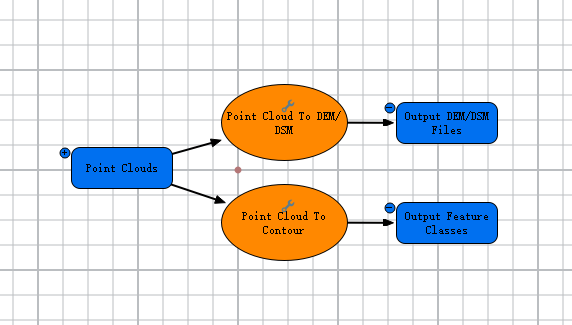
Terrain Output Workflow
If the workflow cannot run due to incorrect input data, or if custom parameter settings are required, you may modify the input data or step parameters. For details, see Add and Connect Data and Tools, and Modify Elements.
Ensure the workflow is in a runnable state before processing. This workflow supports distributed processing but only executes in non-distributed mode. For the difference between non-distributed and distributed processing, see Run and Stop Model.