Detect Moving Objects
Function Description: Used to detect point clouds of moving objects during mobile scanning and assign them to a specified category.
Steps
1.Run Classify Ground Points by CSF to separate ground points;
2.Run Classify By Height Above Ground, set the minimum height to 0.5m and maximum height to 3.0m;
3.Run Assign Groups function to perform group clustering;
4.Run Detect Moving Objects, the interface is displayed as follows:
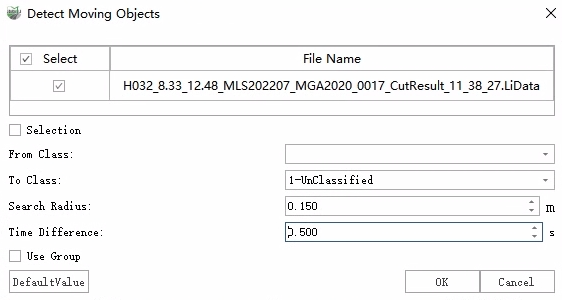
5.Check Select to activate the selection tool, which provides platform-common selection tools such as polygon, rectangle, and sphere. Unchecking Subtract means adding to selection. Clear is used to clear all selections.
6.Select the result category from step 2 as the From Class, check Use Group, and click Confirm to run the detection.
Parameters
For non-moving objects, different scan lines at different moments will fall on the object during the scanning process, so points at different moments will exist in the neighborhood.
From Class: The point category participating in the detection.
To Class: Dynamic object points will be assigned to this category.
Search Radius: Neighborhood search radius.
Time Difference: Maximum time difference threshold for neighborhood points. If the time difference is less than this value, the point is considered a moving object point.
Use Group: If checked, when point clouds within a group (having the same GroupID value) are detected as moving objects, the entire group will be considered moving objects. This can effectively avoid situations where only part of the points of an actual moving object are detected. Unchecking will not use group information.