Reference Plane
Description
The reference plane is a drawing plane set in the main window of the vector editing module. When drawing lines, rectangles, and polygons, the reference plane setting interface automatically pop up. When drawing vector objects in the main window and the associated window, they are limited to the reference plane.
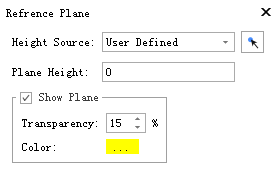
Parameters
Height Source:The reference plane is a horizontal plane, and the corresponding height can be set of multiple sources:
Customize:Users can customize the height by manually entering.
Min Z:Take minimum Z of point cloud as height.
Middle Z:Take middle Z of point cloud as height.
Max Z:Take maximum Z of point cloud as height.
Elevation Filter:Height refer to the center position value in Elevation Filter.
Plane Height:Show plane height.
- Show Reference Plane:Whether to show reference plane or not.
- Transparency:Transparency setting of reference plane.
- Color:Color setting of reference plane.