Forest Tending Planning
Function Overview
Forest Tending Planning automatically generates a forest tending management planning report and operation design table based on point cloud data, automatically extracted individual tree attributes, and a configurable tending scheme. It is used to support sustainable forest management.
Usage
Click TLS Forest > Forest Tending Planning.
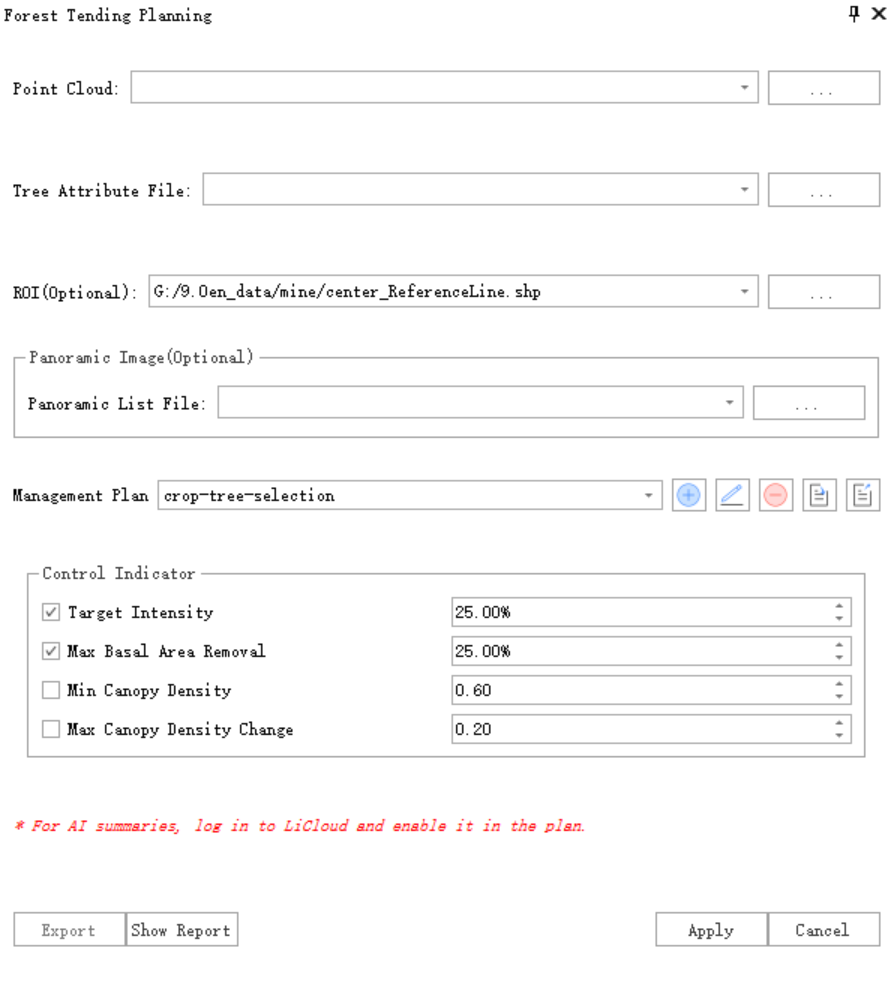
Parameter Settings
Point Cloud File: Stand point cloud file used for analysis.
Individual Tree Attribute File: Individual tree attribute file corresponding to the point cloud data. It can be generated from individual tree segmentation or statistic individual tree attributes.
ROI (optional): Vector polygon file defining the area of interest. When set, only individual trees inside the ROI participate in the analysis.
Panoramic Images (optional): Panorama data used by the report to generate individual tree image screenshots.
- Panorama Image List File: Panorama image list file used by the report.
- Panorama Image Folder: Folder where panorama images are stored, corresponding to the panorama list file.
Management Scheme: Scheme used for analysis. Users can adjust a built-in scheme or fully customize a scheme. See the scheme configuration section for details.
Control Indicators: Control indicators of the management scheme. Default values come from the scheme configuration. Each indicator can be enabled or modified.
- Target Intensity: Tree-count harvesting intensity, namely the maximum percentage of trees to harvest.
- Maximum Basal Area Removal: Basal-area harvesting intensity, namely the maximum basal area removal ratio.
- Minimum Crown Closure: Minimum stand crown closure after harvesting.
- Maximum Crown Closure Change: Maximum crown closure change before and after harvesting.
Scheme Configuration
Schemes can be added, edited, deleted, imported, and exported from the toolbar.

Report Settings
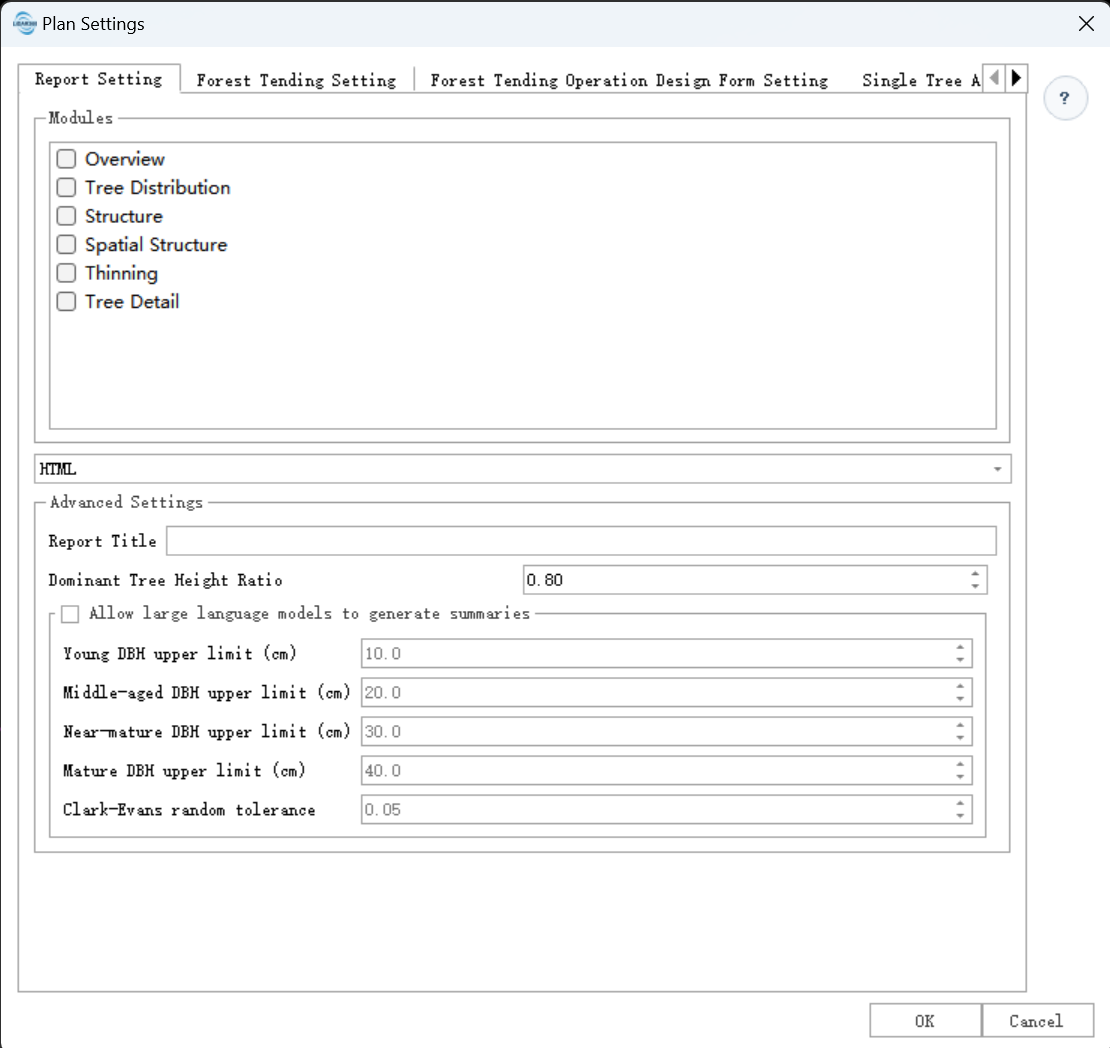
Report Module Configuration: Includes overview, tree distribution charts, structural statistics charts, spatial competition structure charts, thinning decision maps, and tree detail pages. Select or clear modules to control whether they appear in the final report.
Advanced Settings:
- Report Title: Default report title.
- Dominant Tree Height Ratio: Ratio used to calculate dominant tree height from trees sorted by height.
- Allow LLM to Generate Summary: Enables a large language model to generate analysis summaries for some report modules based on statistics.
- Young Tree DBH Upper Limit: Effective only when LLM summary generation is enabled. Trees with DBH below this value are treated as young trees.
- Middle-aged Tree DBH Upper Limit: Effective only when LLM summary generation is enabled.
- Near-mature Tree DBH Upper Limit: Effective only when LLM summary generation is enabled.
- Mature Tree DBH Upper Limit: Effective only when LLM summary generation is enabled.
- Clark-Evans Random Tolerance: Critical range or confidence interval used in significance testing to determine whether the tree distribution is clustered, random, or uniform.
Forest Tending Settings
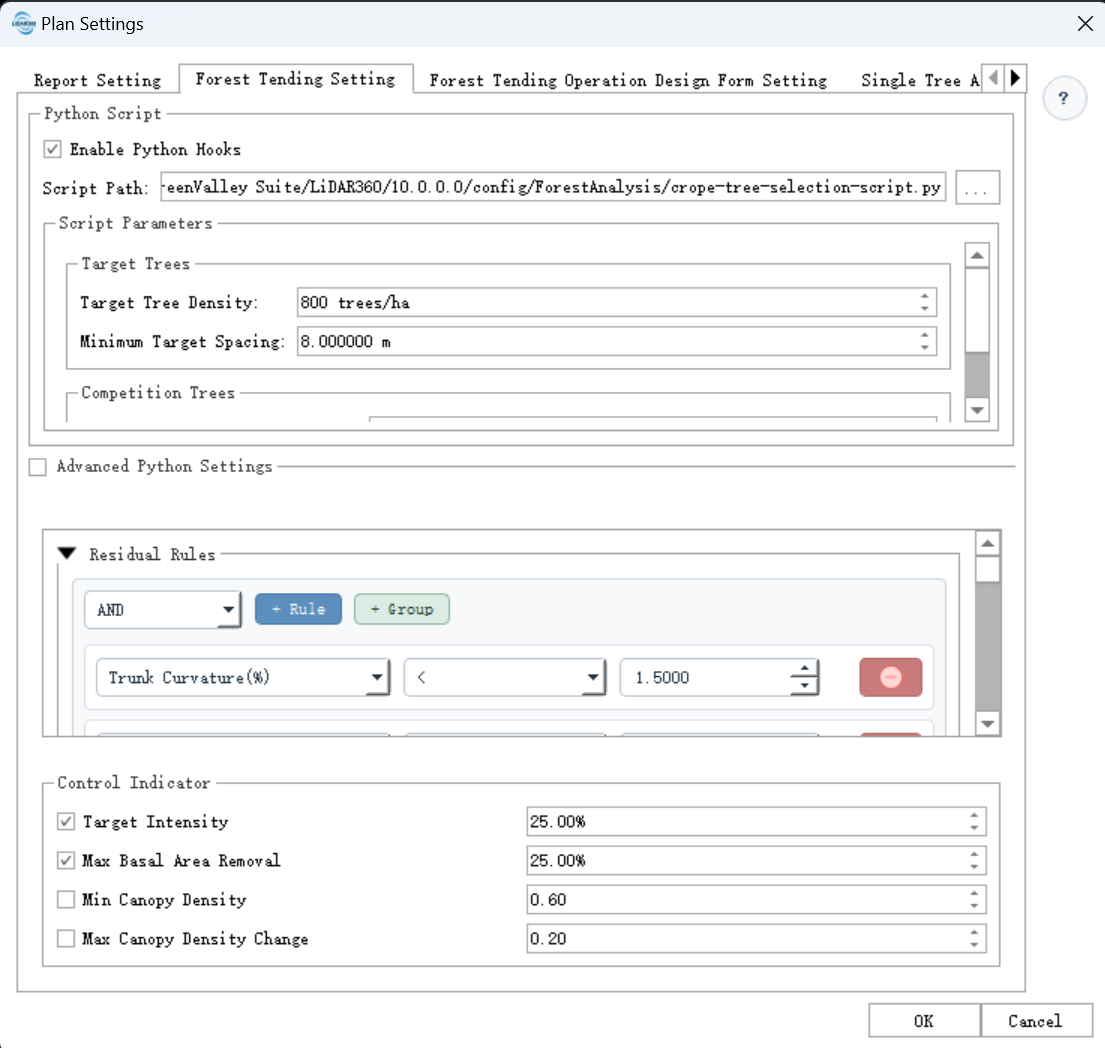
Python Script:
- Enable Python Hook: Specifies whether to use a Python script.
- Script Path: Python script path. The default script provided by the scheme or a custom secondary development script can be used.
Rule Configuration: Rules can be configured as retention rules and harvesting rules. The rules support AND/OR logic and operators such as
>,<,<=,>=,==, and!=for built-in individual tree attributes and Python-script-extended attributes.Retention Rule: Individual trees that meet retention rules become candidate reserve trees. Candidate reserve trees are finalized by the reserve tree selection stage in the script. If no script filtering is used, trees that meet the configured rules are mandatory reserve trees.
Harvesting Rule: Individual trees that meet harvesting rules become candidate harvested trees. Candidate harvested trees are finalized by the harvesting tree selection stage in the Python script. The script defines priority and score, and final harvested trees are selected according to priority and score while satisfying the control indicators.
Control Indicators: Default control indicators include maximum tree-count harvesting intensity, maximum basal area harvesting intensity, minimum crown closure after harvesting, and maximum crown closure change before and after harvesting. The scheme configuration sets whether each indicator is enabled by default and its default value. These values can be modified before each execution in the main interface.
Forest Tending Operation Design Table Settings
Enable Operation Record Export: Exports the operation design table together with the report.
Append Stand to Overview Table: If the saved operation design table already exists, the current stand record is appended to the existing table.
Use Custom Script: When a custom script is enabled and a custom script path is set, the custom script logic is used to save the operation design table.
Overview Table: Effective when the default save logic is used. Configure groups, subgroups, headers, attribute fields, formats, and other settings for the stand overview page. Attribute fields come from built-in stand attributes and user-defined attributes configured on the forestry information page, such as area, tree count, harvesting intensity, and crown closure.
In the example, Basic Information is the group, Center Point Geographic Coordinates is the subgroup, and attribute fields include unit, forest region, place name, compartment, subcompartment, X, and Y.
- Individual Tree Detail Table: The configuration is similar to the overview table, but the table records individual tree attributes.
Individual Tree Attribute Settings
See Forestry Configuration. These settings are used for individual tree attribute calculation during analysis.
Secondary Development Script
For forest tending secondary development, see Forest Tending SDK Developer Guide.