Spectral Subset
Function Overview
Crop the spectral bands of the image.
Usage
Click Spectrum > Spectral Subset.
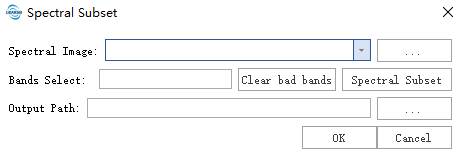
Click the Spectrum Subset button to select the band of the hyperspectral image.

Parameter Setting
- Input hyperspectral image data: Input the hyperspectral image data file. Data should be pre-processed, such as radiation calibration and atmospheric correction.
- Band selection: Select the band of the hyperspectral image. For PCA function, please click Clear the bad band before using it.
- Output path: The generated tif path.