Classify by Tree Attribute
Function Overview
Classify by Tree Attribute is a classification tool for LiDAR360 forestry data. Based on a tree attribute file, the tool reclassifies point clouds according to individual tree attribute conditions. It can classify points that meet rules based on tree ID, tree height, crown width, and other tree attributes to a target point cloud class. It is commonly used for individual tree point cloud refinement, accurate tree-level classification, correction of misclassified vegetation, and tree-zone-based classification.
Usage
Click Classification > Classify by Tree Attribute.
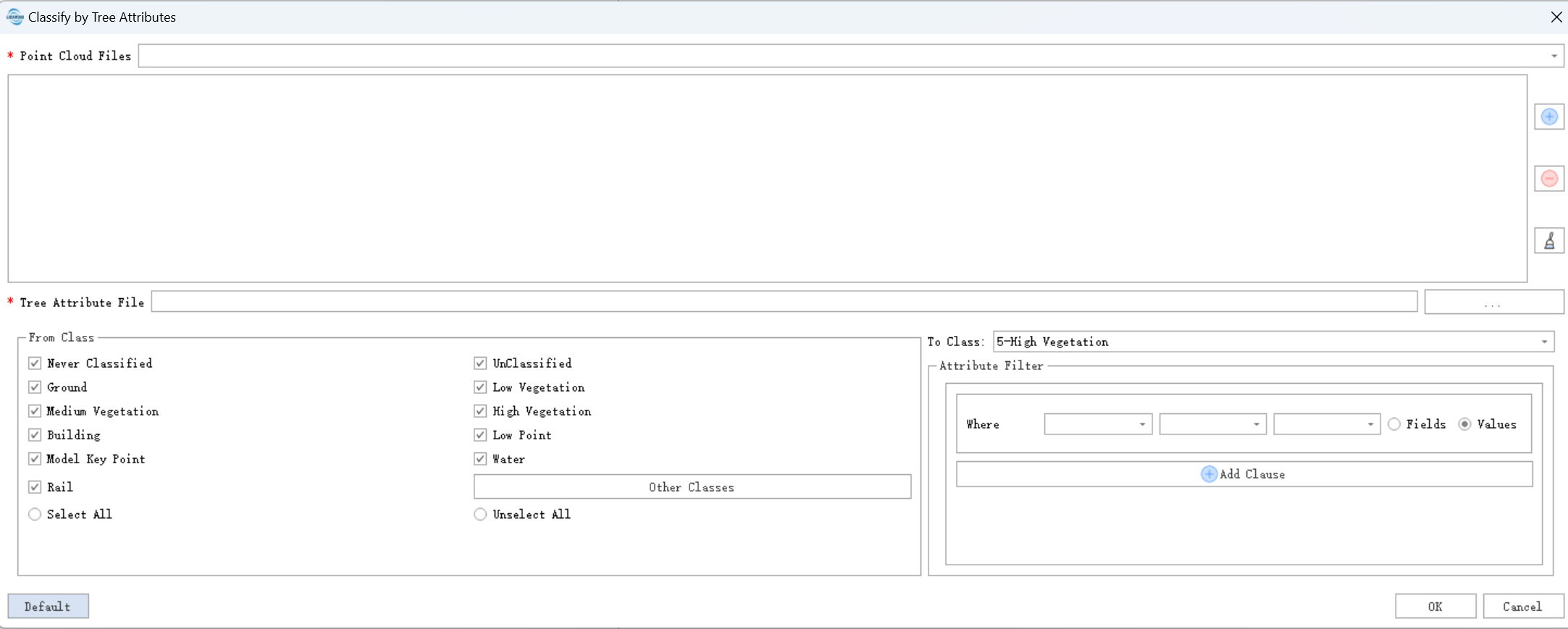
Parameter Settings
Input Data: The input can be a single point cloud file or a point cloud dataset. The data to be processed must be open in LiDAR360.
Tree Attribute File: Tree attribute file corresponding to the point cloud data. Supported formats include
*.treedband CSV.From Class: Source class to be classified.
Target Class: Target class assigned to points that meet the filter rules.
Attribute Filter: Builds filter conditions based on tree fields in the
treedbfile.Single Condition Structure: Attribute field + operator + threshold/comparison value.
- The left drop-down list selects a field, such as tree ID, tree height, crown width, DBH, and other built-in tree attributes in
treedb. - The middle drop-down list selects a logical operator:
=,>,>=,<,<=, or!=. - The right input box sets the numeric value, ID, or other threshold.
- The right radio button selects Value or Field. In most cases, select Value and enter a custom value.
- The left drop-down list selects a field, such as tree ID, tree height, crown width, DBH, and other built-in tree attributes in
Add Condition: Click the blue + Add Condition button to add multiple filter rules.