Auto Create Buildings
Functional Overview
Based on the general architectural model description, the Lidar360 automatic modeling function generates level-of-detail(LOD)2 architectural models. For the LOD 2 architectural model, the main expression is the shape of the roof, and the wall is a vertically stretched plane. Automatic building modeling is based on ALS point cloud data and building vector footprint. The vector footprint is mainly used to determine the scope of each building and constrain model generation. Automatic modeling creates a high-precision Lod2 model of a building, and the resulting model can be modified in detail with manual editing tools.
Usage
Process of creating building models automatically is as follows:
Use the classification tool to classify ground points.
(Optional) Use the classification tool to classify buildings.
3.Click 3D Modeling > Auto Create Buildings button, pop up a dialog box:
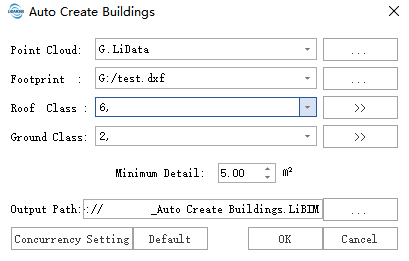
- Set parameters and click OK to start the execution.
Parameters Settings
- Point cloud file: Select point cloud data from the software opened or from the folder. Point cloud data should be classified by the ground points at least.
- Building footprint file: Building vector footprint file supports shp, dxf, gpkg format file, can be generated through the Lidar360 vector editing module or use the existing building footprint file.
- Roof Class: It is used to determine the use of point cloud when extract the shape of the roof. Building category is selected by default. If building classification is not performed on the data, you can co-opt the creation points, unclassified points, or user h household to customize the category of roof.
Ground Class: It is used to determine the floor elevation of a building. The ground point category is used by default.
Output Path: The path to save the model file.