Deviation Analysis
Description
To calculate the distance between two point cloud. The distance of each point of the compared point cloud from the reference point cloud will be saved as an additional attribute. This function can calculate the distance between any two point in 3D space, which can be used for deviation analysis.
Usage
Click Terrain > Multi-period Analysis > Deviation Analysis.
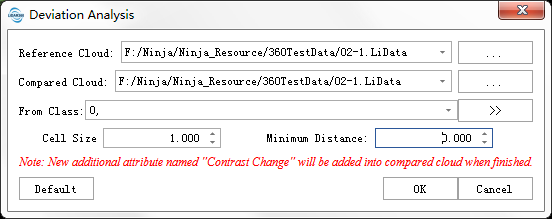
Settings
- Reference Cloud: Selected reference LiDAR data.
- Compared Cloud: Selected LiDAR data to be compared.
- From Class: Select point class involved in Deviation Analysis.
Cell Size: The edge length of the 3D grid voxels used to calculate distances between point clouds. A smaller value results in more detailed deviation analysis between point clouds, while a larger value yields coarser analysis.
Minimum Distance: The additional attribute value of points with distances smaller than this value will be set to 0. Additional attributes for distances greater than this threshold will be preserved.
- Maximum Distance: The additional attribute value of points with distances larger than this value will be set to 0. Additional attributes for distances smaller than this threshold will be preserved.
- Default: Click this button to restore all parameters to their default values.
- Output Path: Select the output path for the HTML report.