Options

Function Description: This feature includes software system settings, view settings, rendering, category priority settings, shortcuts, and measurement settings. Category priority determines the order of categories in cross-sections, and the order is reflected in the classification interface and category settings interface. Shortcuts allow for quick access to commonly used system functions.
Steps
- Upon selecting this feature, the following interface will appear. System settings include interface theme and language settings. Users can choose from themes such as Landscape, Blue, White, and Dark Gray. Languages available are English, Chinese, French, Japanese, Korean, and Russian.
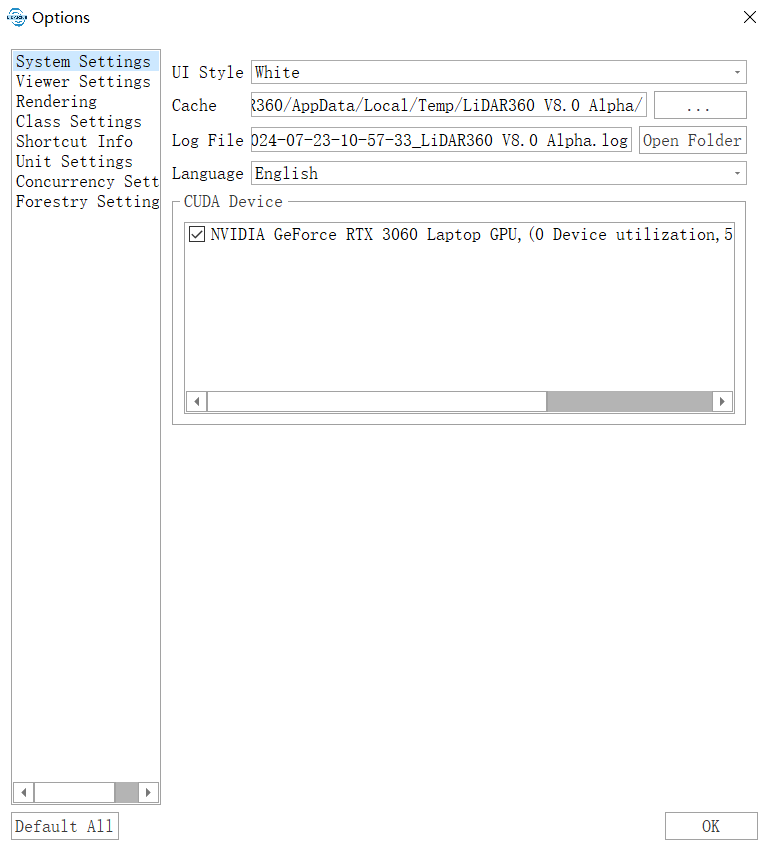
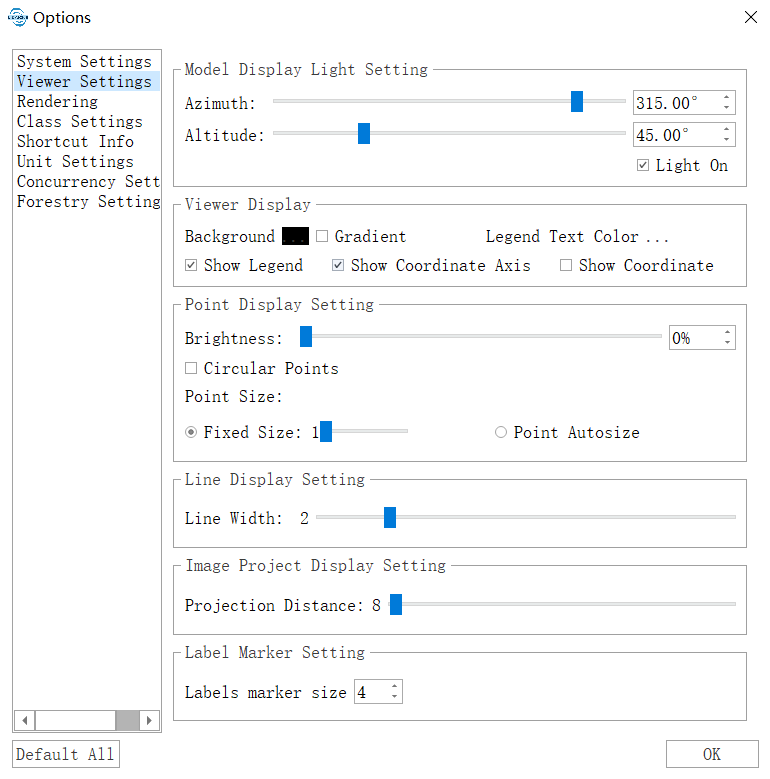
- The "Viewer Settings" option allows users to configure the display of models in all software views, including lighting settings, background color (enabling the "Gradient" option next to the background color allows for a gradient background effect), point display in point clouds, and label properties. Lighting settings apply only to model files (such as LiModel, LiTin, OSGB, etc.) and allow for changes to the light source position.
- The "Rendering" option includes real-time contour settings. Users can configure the contour base, contour interval, line width, primary and index contour colors, etc. The "Use shader rendering color strategy" checkbox determines whether to use shaders for rendering the color strategy of point clouds. The shader rendering color strategy allows the same point cloud to be displayed with different color strategies in different windows, utilizing programmable pipeline shader technology.
- The "Class Settings" option allows users to define default categories within the software.
- The "Shortcut Info" option enables users to customize keyboard shortcuts. Refer to Shortcuts for details on how to set them.
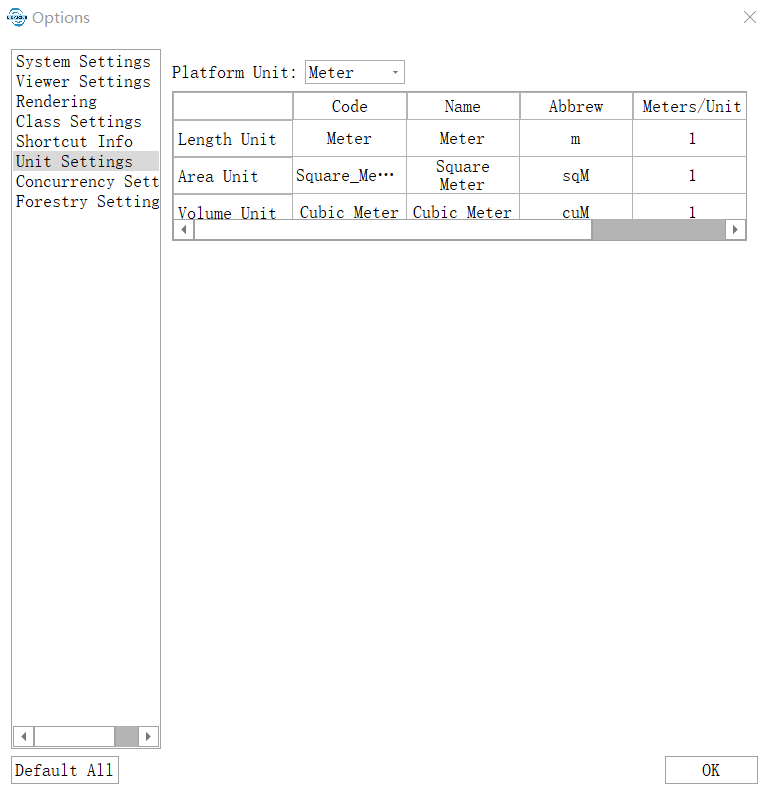
- The "Unit Settings" option changes the interface as shown below.
If the source and target units are the same, the measurement results will be displayed in the corresponding units. If the source and target units differ, the results will be multiplied by the scale factor between the units, and the displayed unit will be the actual target unit.
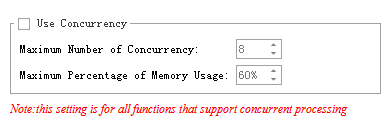
- Clicking the "Concurrency Settings" option changes the interface as shown below.
Here, users can configure the concurrency parameters used in certain computational processes. The "Use Concurrency" checkbox determines whether concurrency is enabled. Concurrency parameters can be applied to functions such as noise removal, noise filtering, and point cloud smoothing. "Maximum Concurrency Count" refers to the maximum number of threads used during computation, while "Maximum Memory Usage Ratio" specifies the maximum percentage of physical memory that can be used during concurrency.
Clicking the "Forestry Settings" option changes the interface as shown below.
This section allows users to configure settings for individual tree segmentation, attribute statistics output, DBH, tree height, volume, carbon storage, and related forestry calculations.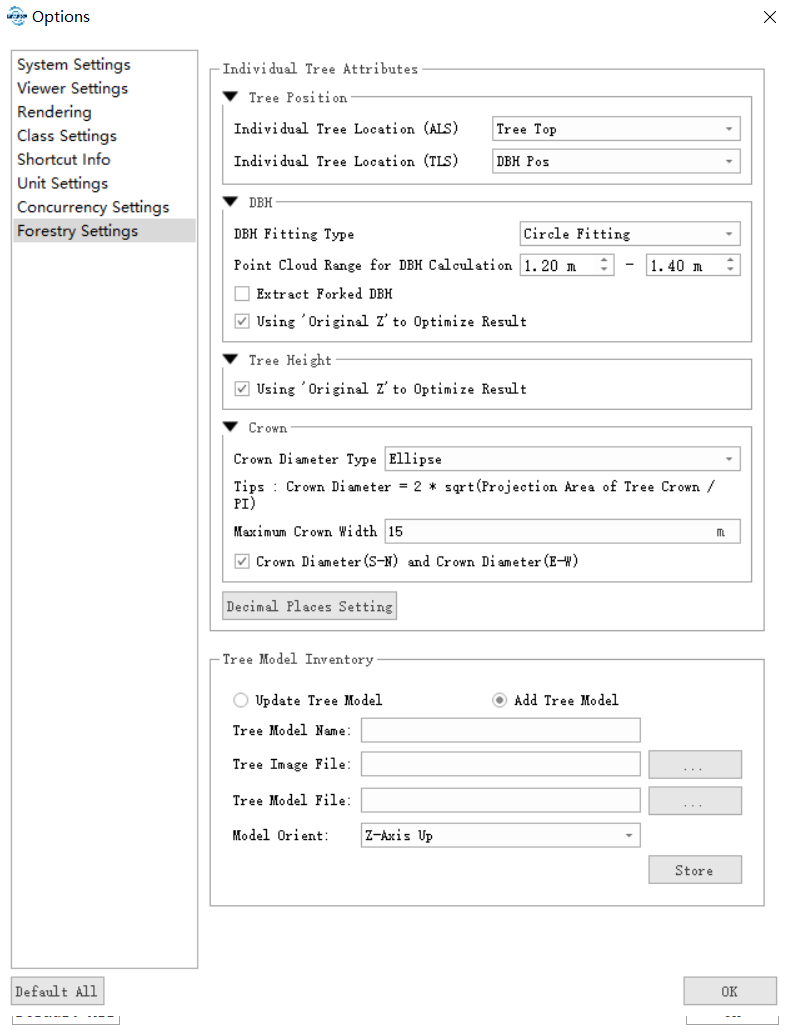
- Parameter Calculation Settings:
- Individual Tree Location (Airborne Forestry): Sets the tree location type used in airborne forestry individual tree segmentation or attribute statistics output. Options include Tree Top and Centroid.
- Individual Tree Location (Ground-based Forestry): Sets the tree location type used in ground-based forestry output. Options include Tree Top, Centroid, and DBH Position.
- Crown Diameter Calculation Method: Sets the calculation method for crown diameter in the output results. Options include Average, Derived from Fitted Circle, and Derived from Fitted Ellipse.
- Average: Crown Diameter = (North-South Crown Diameter + East-West Crown Diameter) / 2.
- Derived from Fitted Circle: Crown Diameter = 2 * sqrt(Canopy Projection Area / pi).
- Derived from Fitted Ellipse: Crown Diameter = sqrt(North-South Crown Diameter * East-West Crown Diameter).
- Decimal Places for DBH Output: Sets the number of decimal places retained for DBH values in output results.
- Precision of Other Attributes: Sets the number of decimal places retained for attributes other than DBH.
- DBH:
- DBH Fitting Type (Default: Circular Fitting): Supports circular fitting, elliptical fitting, and cylindrical fitting.
- Point Cloud Height Range for DBH Calculation: Sets the point cloud height range used for DBH calculation. Most countries use 1.3 m, normally 1.2 to 1.4 m; Japan commonly uses 1.2 m.
- Use Original Z to Optimize Result (Checked by default): Uses original Z values to optimize the DBH result. If original Z values are not generated, this can be obtained through Data Management > Normalization.
- Tree Height:
- Use Original Z to Optimize Result (Checked by default): Uses original Z values to optimize the tree height result. If original Z values are not generated, this can be obtained through Data Management > Normalization.
- Calculation Method: Supports inclined height, vertical height based on ground points, and vertical height.
- Crown Base Height:
- Branch Diameter Statistic Method: Sets the calculation method for the branch diameter below the crown base height. Supported methods include average fitted-circle diameter, maximum fitted-circle diameter, and minimum fitted-circle diameter.
- Individual Tree Segmentation:
- Maximum Crown Width (Default: 15 m): The crown width of trees in the forest stand. This is mainly used for individual tree segmentation reconstruction and individual tree attribute statistics. A value that is too small may cause over-segmentation, while a value that is too large may reduce program efficiency.
- North-South Crown Diameter and East-West Crown Diameter: Sets whether to output north-south crown diameter and east-west crown diameter.
- Volume:
- Automatically Segment Stems (Checked by default): Automatically segments a stem dynamically, and each log is calculated using the specified method.
- Minimum Vector: Distance threshold in the Douglas-Peucker curve approximation algorithm. During processing, each point between the start and end of a curve is calculated, and its perpendicular distance to the line between the endpoints is measured. Only points with a distance greater than this threshold are retained as key points, and the remaining points are treated as redundant points.
- Segment by Length (Checked by default): Segments stems by the specified length. Each log is calculated using the specified method. Different lengths are used when the set stem length is less than or greater than a specified value.
- Log Range Calculation: Calculates stem points within a specified Z height range.
- Calculation Formula: Currently supports two formulas: central-section volume and central-section volume by radius.
- Recognition Level: Sets the precision level for recognition. Single-tree and multi-tree levels are currently supported. The former treats only the current selected tree as the stem, while the latter extracts multiple stems after recognizing them.
- Result Value: Supports single-stem and weighted-average values. Single-stem uses the volume of the selected stem as the final result. Weighted average uses the branch length as the weight to calculate the weighted average volume as the final result.
- Carbon Storage:
- Automatically Segment Stems (Checked by default): Automatically segments a stem dynamically, and then calculates each section and sums them as the total volume.
- Minimum Vector: Distance threshold in the Douglas-Peucker curve approximation algorithm.
- Segment by Length (Checked by default): Segments stems by the specified length, and then calculates each section and sums them as the total volume.
- Tree Species: Sets the priority for tree species recognition result output. Currently supports tree species library, deep learning, and general parameters.
- Effective Section: 80% indicates that sections above 80% of the location are treated as effective sections.
- Unit for Length: Sets the length unit used in output results such as tree height, DBH, and crown diameter. The minimum unit is centimeters.
- Parameter Calculation Settings:
Click the Restore Defaults button to restore system defaults.
- Press the P shortcut key in the window to adjust the light source position.