Align to Point Cloud
When the image project lacks ground control points, insufficient ground control points, or is affected by other factors, there will be stratification between the image point cloud and the actual terrain, or when the image project is used to give color to the laser point cloud, there may be a large color deviation.
The image point cloud registration tool uses laser point clouds as a reference to register the image point clouds to laser point clouds to improve the layering between the image point clouds and laser point clouds. This tool optimizes the 6 external orientation elements of the image (camera position and camera attitude angle) and camera boresight angle of the image by establishing the matching relationship between the feature planes of the image sparse point cloud and laser point cloud. This tool provides two registration methods: adjust the external orientation element and adjust the external orientation element and camera boresight angle. After the execution of this tool, a new image project liaep file will be generated, where the external orientation elements and camera boresight parameters of the image are updated values, and the internal orientation elements and camera distortion parameters will not be adjusted.
Adjust The Orientation Elements Outside The Image
By adjusting the six external orientation elements of the image (camera position and camera attitude angle), the distance between the sparse points and the laser point cloud feature plane is minimized.
Adjust The External Orientation Elements And Camera Boresight Angle
When equipped with a combined navigation system, the camera's boresight angle is the angle of the camera relative to the IMU. By adjusting the six external orientation elements of the image (camera position and camera attitude angle) and the camera's boresight angle, the distance between the sparse points and laser point cloud feature planes is minimized.
Interface Parameter Description
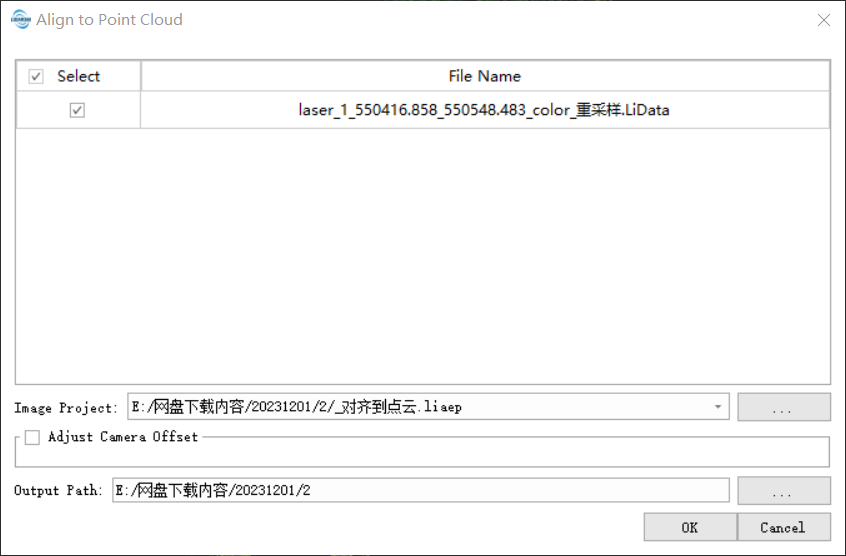
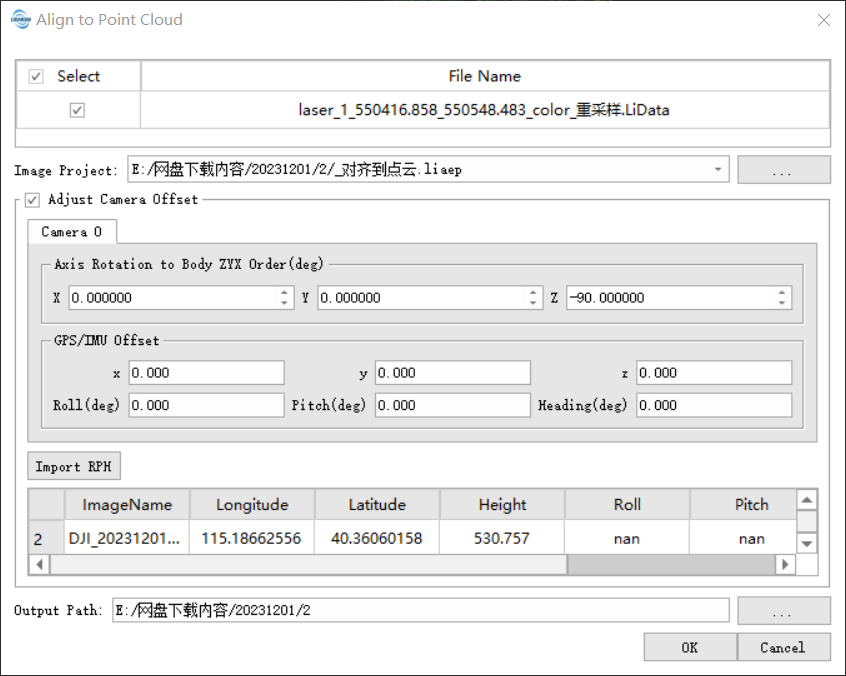
- Image Project: Image Project to be registered.
- Adjust Camera Boresight: When checked, adjust the external orientation elements and camera boresight angle at the same time. To solve the camera's boresight angle error relative to the IMU, it is necessary to know the camera's installation angle and boresight error, and the image should record the attitude angle at the exposure time; when not checked, only the external orientation elements are adjusted.
- The Axis Rotation To ZYX order (degree): The installation angle of the camera relative to the IMU is not adjusted, and it can generally be obtained from the manufacturer. The design installation angle of the LiAir series is 0, 0, -90.
- GPS/IMU Boresight: The initial value of the boresight error of the camera relative to the IMU.
- x, y, z: The offset of the camera relative to the IMU is not adjusted.
- Roll Pitch Heading: The camera's boresight error relative to the IMU will be adjusted.
- Import RPH: If the image does not record the posture angle at the exposure time, the camera's exposure point file can be imported. The image exposure point record file must have the image name, longitude, latitude, roll, pitch, and heading fields.
- Output Path: Output result path, containing updated image project files and reports.
When adjusting the camera boresight angle, flight missions are typically carried out in a cross-strip pattern at the same altitude and with intersecting flight lines at different altitudes, which helps improve the accuracy of boresight angle error calibration. The matching of the feature matching of image sparse point clouds and laser point clouds is easily affected by noise. For image sparse point clouds with more noise, noise filtering should be carried out, such as power line points, sparse vegetation points, etc. If the cloud features of the sparse image points and the nearest laser point meet certain matching conditions, a set of matching pairs is formed. The feature matching depends on good surface features, including the roof, walls, and pavement of the building. For vegetation areas, good surface features cannot be obtained and registration may fail.