Sample Data and Independent Variables
Sample Data
All regression analysis methods require sample data (sample data can be obtained from ground surveys or by terrestrial/backpack LiDAR scanning) to train regression analysis models. In the regression analysis dialog's import training data, input sample data. Sample data should be in text format (.txt extension) and must contain a file header describing the data information. The first two columns should be the X and Y coordinates of the samples, followed by any dependent variables (multiple dependent variables may be provided, but only one dependent variable is used in each regression analysis). If each sample corresponds to a tree, then the dependent variable value can be tree height. For information about sample data, refer to Sample Data File Format in the file format section of the appendix.
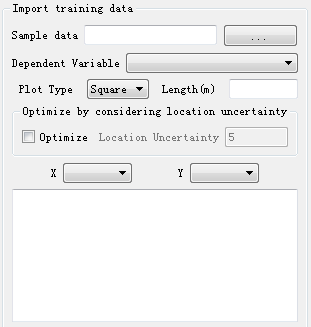
Parameter Settings
- Sample Data: Click the
 next to the sample data input box to select sample data.
 - Dependent Variable: This parameter defines the dependent variable used in regression analysis. Only one dependent variable is used at a time. Optional options are variables in the sample data, for example: if the sample data contains fields for sample coordinates X, Y, and tree height, then the dependent variable dropdown options can select X, Y, and tree height.
- Sample Plot Type: This parameter defines the sample plot type, selected according to the actual situation of the sample survey.
- Square (Default): Sample plot is square.
- Circular: Sample plot is circular.
- Length (Meters): When the sample plot type is square, the side length of the sample plot needs to be set.
- Radius (Meters): When the sample plot type is circular, the radius of the sample plot needs to be set.
- Tolerance Range: The model internally searches for points satisfying the range based on this value as test points, selecting the point with the highest accuracy according to the internally generated model accuracy as the training sample point.
- X: Sample plot center coordinate X.
- Y: Sample plot center coordinate Y.
Independent Variables
CSV format data or TIF data can be imported. CSV data format must contain X, Y, XSize, YSize four field information, and each column information will be added to the list as independent variables. Note that only one CSV data can be added; while multiple TIF data can be added, each successfully added TIF data will be added to the list with its file name as an independent variable. In the independent variables options, select the independent variables used in regression analysis (for more information about each independent variable, please refer to Height Variables, Intensity Variables, Canopy Cover, Leaf Area Index and Gap Fraction).
Note: Sample data needs to be included within the range of imported independent variable data; all imported TIF independent variable data must have consistent XY range and scale; when importing CSV files, there will be X, Y, XSize, YSize four fields imported into the list as independent variables. It is best to delete these 4 independent variables, or retain X and Y according to the actual situation; during analysis, it is best to have the number of samples greater than the number of independent variables, otherwise it may lead to infinite solutions in the matrix solving process.