Solar Radiation
Function Overview
The Solar Radiation tool is used to calculate solar radiation for a specific time period, outputting direct, diffuse, and total solar radiation values.
Usage
Click on Terrain > Incident Solar Radiation.
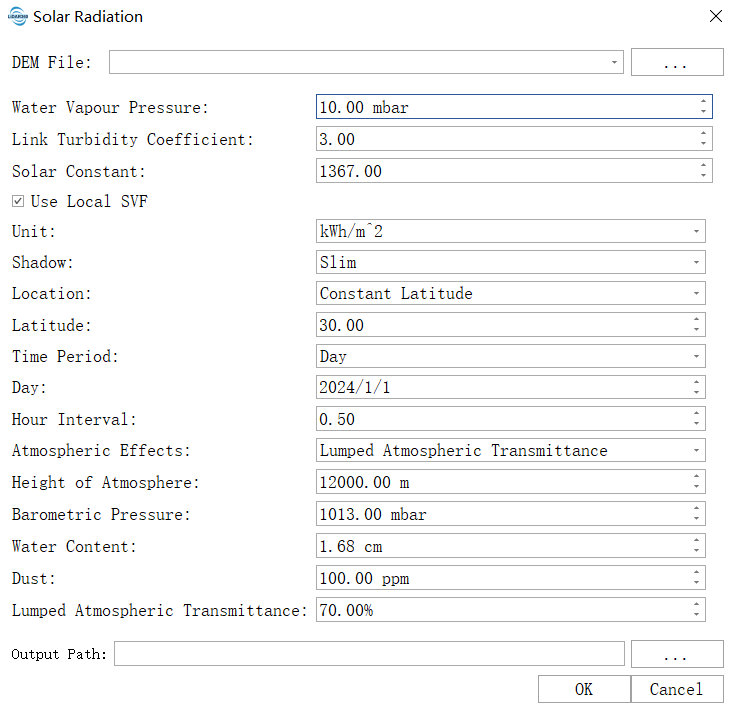
Parameter Settings
- Input DEM File: The input DEM file. For information on generating a DEM, see Point Cloud to DEM. Topographic data is used to calculate slope, aspect, and terrain shading, which form the basis for radiation transmission simulation.
- Water Vapour Pressure: An atmospheric height and pressure constant parameter. Represents the near-surface water vapor pressure parameter, affecting radiation absorption. The higher this value, the greater the atmospheric humidity and the stronger the absorption of solar radiation, resulting in less direct radiation reaching the ground. The default value is 10 mbar (10 hPa). In humid environments (e.g. coastal areas, rainy seasons), it can be increased to 12–15. In dry environments (e.g. inland areas, dry seasons), it can be reduced to 5–8.
- Link Turbidity Coefficient: An atmospheric turbidity coefficient describing the obstruction of light transmission by colloidal substances. The higher the value, the generally more severe the atmospheric pollution. Enabled when using the detailed atmospheric model. This coefficient comprehensively describes the scattering and absorption capacity of aerosols and dust on solar radiation. The default value is 3.0, corresponding to very clean air. 2–3: represents clean atmospheric conditions (e.g. high mountains, remote areas); 4–5: represents moderate turbidity (typical rural environments); 6+: represents high turbidity (urban or industrial areas).
- Solar Constant: The total solar radiation energy received per unit area per unit time, in a direction perpendicular to the sun’s rays at the top of Earth’s atmosphere. The default value is 1367 W/m², an internationally accepted standard value based on satellite observations, representing the radiation intensity at the average Earth-sun distance. For routine analysis, keep the default value. This is a fundamental physical constant and should not be modified arbitrarily. Only in rare cases, such as adhering to the strict requirements of a specific study or model, should it be adjusted according to its specifications.
- Unit: A universal parameter. Defines the unit of output radiative energy. Kilowatt-hour/square meter: Recommended for engineering applications, an industry standard in energy fields, very intuitive and easy to directly compare with photovoltaic power generation. Kilojoule/square meter, Joule/square centimeter: Other energy units commonly used in scientific research and specific domain literature.
- Shadow: Options for shadow tracking:
- slim: Standard algorithm, accurately calculates terrain-cast shadows, the recommended option.
- fat: Uses a more conservative algorithm that slightly expands the shadow area.
- none: Ignores terrain shading, leading to severely overestimated radiation values on shaded slopes, not recommended.
- Latitude: When the input data cannot calculate latitude from spatial reference, this parameter is used as the data latitude. It defines the geographic latitude of the center point of the study area and is the basis for calculating solar altitude angle and day length. For input surface raster data with spatial reference, the average latitude is automatically calculated; otherwise, this latitude value will be used. When latitude cannot be calculated, this parameter must be accurate; otherwise, it will cause systematic calculation bias. North latitude is positive (e.g. Beijing 40.0), south latitude is negative (e.g. Sydney -33.9).
- Time Period: Sets the time period for the calculation; options include:
- moment: A specific moment, calculates instantaneous radiation flux using only date and time parameters.
- day: A single day, calculates the cumulative daily radiation using only date and time interval parameters.
- range of days: A range of days, calculates the cumulative radiation total over a specified date range (e.g. annual total radiation), using only date, time interval, and time step parameters.
- Start Day: Defines the starting calendar date for the simulation calculation. Valid when the Time Period option is set to range of days.
- End Day: Defines the ending calendar date for the simulation calculation. Valid when the Time Period option is set to range of days.
- Day: The date to be calculated. Valid when the Time Period option is set to day. Equivalent to setting the start and end dates to the same day for daily solar simulation.
- Moment: The specific moment to be calculated. Valid when the Time Period option is set to moment. A general time period parameter. Used to specify the solar time for instantaneous radiation flux calculation. The default value is 12. Example: 12.0 (noon), 13.5 (1:30 PM). Typical application: Analyzing peak radiation at noon (12.0) or lighting conditions at a specific moment.
- Hour Interval (Hours): Defines the time step (in hours) for calculating the sun’s position and radiation flux within a day. Default is 0.5. Used when calculating solar radiation on a daily scale. Valid for Time Period options: day and range of days. 0.5: Calculates every 30 minutes (a good balance between precision and efficiency). 0.25: Calculates every 15 minutes (higher precision but greater computational resource consumption).
- Day Interval (Days): Defines how many days to sample during the period from the start date to the end date for calculating solar radiation over time. Valid for Time Period option: range of days. A sampling interval set to balance calculation efficiency and precision for long-term (multi-day) simulations. The default is 5, meaning the program calculates a complete radiation process for a representative day every 5 days, and the results for the other days are obtained through interpolation.
- Atmospheric Effects: Describes the atmospheric impact factors model, including atmospheric height, water content, dust, and atmospheric transmittance. Choose an atmospheric model to determine which atmospheric parameters to use.
- Height of Atmosphere and Vapour Pressure: A simplified model using a fixed standard atmospheric profile, adjusting atmospheric absorption via vapor pressure coefficient and atmospheric height.
- Air Pressure, Water and Dust Content: A detailed physical model that finely simulates atmospheric attenuation using a set of specific meteorological parameters, including air pressure, precipitable water, and dust content.
- Lumped Atmospheric Transmittance: An extremely simplified empirical model that uses a single overall atmospheric transmittance percentage to represent the overall atmospheric transmittance capability.
- Hofierka and Suri: A specialized algorithm model developed by Hofierka and Suri researchers. This method does not require importing local sky view factors and uses only a single linked turbidity coefficient along with fixed standard atmospheric parameters or a simplified process for calculation.
- Height of Atmosphere: An atmospheric height and pressure constant parameter. Defines the upper boundary height of the atmospheric column involved in radiation transmission calculations. The default value of 12000 meters corresponds to the standard tropopause height, covering the vast majority of atmospheric mass, suitable for most application scenarios. It is recommended to keep the default. For high-altitude area studies (e.g. the Tibetan Plateau), it can be increased to 15000–18000 meters. For professional atmospheric research, it should be consistent with the selected atmospheric model and meteorological parameters.
- Barometric Pressure: An air pressure, water, and dust content parameter. Refers to the surface atmospheric pressure in the study area, directly affecting the scattering and absorption of solar radiation by the atmosphere. Sea level areas: Can use the default value of 1013 millibars. High-altitude areas: Need to be adjusted according to altitude (approximate formula: 1013 – altitude(km) * 120). It is recommended to use measured values from local meteorological stations.
- Water Content: An air pressure, water, and dust content parameter. Defines the total atmospheric precipitable water, a key parameter in detailed atmospheric models representing water vapor absorption. The higher the humidity, the higher this value should be set. The default is 1.68 cm. Dry environments (e.g. deserts, continental climates): Can be set to 0.5–1.0. Humid environments (e.g. tropical, coastal): Can be increased to 2.5–4.0.
- Dust: An air pressure, water, and dust content parameter. Defines the columnar content of dry aerosols (dust, pollutants) in the atmosphere, directly affecting the scattering attenuation of radiation. The higher this value, the stronger the scattering effect on solar radiation, resulting in reduced direct radiation and increased diffuse radiation. The default is 100 mg/m². Clean environments: Can be reduced to 30–50. Polluted/dusty environments: Can be increased to 200–300.
- Lumped Atmospheric Transmittance: A parameter used when selecting the “Atmospheric Transmittance” model. Directly represents the ratio of solar radiation flux reaching the ground under clear, cloudless conditions to the incident flux at the top of the atmosphere. The default is 70. 75%+: Represents extremely high transmittance in very clean air. 65%–70%: Represents typical clear conditions. <60%: Represents turbid or high-humidity atmospheric conditions.
- Resampling: Processes resampling based on the raster pyramid structure. Different pyramid levels and resolutions are determined by specific data characteristics, with each successive layer downsampled at a 2:1 ratio.
- Resolution: The spatial resolution of the raster. For raster data with fewer than 1000 rows or columns, lower resolution levels will not be displayed. Higher resolution selections yield more precise results but may cause processing failures due to insufficient hardware resources.
- Resampling Method: The algorithm used for raster resampling.
- Output Path: The path for the output files, including direct, diffuse, and total solar radiation TIF files. The direct radiation result for each pixel represents the radiation energy directly received from the sun at that point. The diffuse radiation result for each pixel represents the radiation energy received from the entire sky hemisphere due to atmospheric scattering. The total solar radiation result for each pixel represents the sum of direct and diffuse radiation energy received at that point.