Universal Tree Segmentation
Function Overview
Different from Point Cloud Segmentation, this function separates point cloud segmentation into two steps: stem extraction and point cloud segmentation. In the first step, deep learning is used to extract stems. In the second step, the extracted stems are used as seed points to grow the remaining crown points.
Compared with the TLS Point Cloud Segmentation tool, this method is less affected by shrubs and can extract a more accurate number of stems. It works best for plantations with DBH greater than 10 cm.
Usage
Click TLS Forest > Stem-based Individual Tree Segmentation.
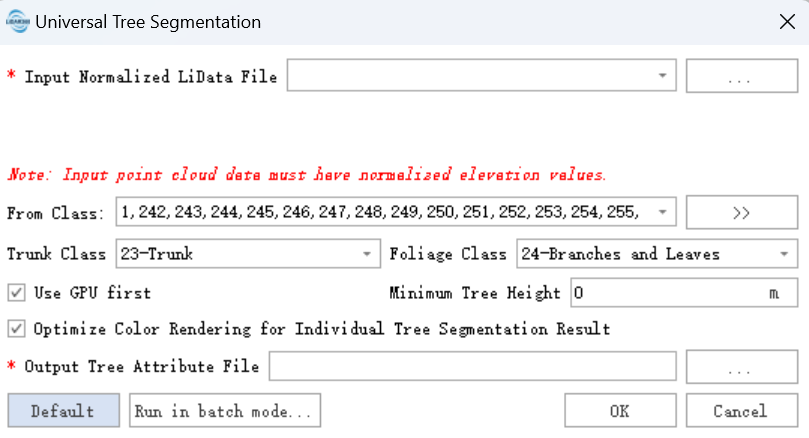
Parameter Settings
Input Data: Input data must be normalized point cloud data. For normalization methods, see Normalization or Normalization by Ground Points. The input can be a single point cloud file or a point cloud dataset, and the data to be processed must be open in LiDAR360.
From Class: Source class used for point cloud segmentation. All classes are selected by default.
Stem Class (default: 23): Extracted stems are assigned to this class.
Branch and Leaf Class (default: 24): Extracted crowns are assigned to this class.
Prefer GPU: Use GPU acceleration when a supported GPU is available.
Minimum Tree Height (m) (default: 2): Filters small trees according to local tree growth conditions.
Optimize Color Rendering for Individual Tree Segmentation Result (selected by default): Rearranges tree IDs after segmentation to reduce the chance that adjacent trees are displayed with the same color.
Output Path: After processing, each point cloud generates a corresponding segmentation result. The result is a comma-separated CSV table containing tree ID, X and Y coordinates, tree height, DBH, crown diameter, crown area, and crown volume. See Individual Tree Segmentation Result File Format. To view the result, see Check Point Cloud Segmentation Results.
Default: Restore all parameters to their default values.