Project Textures from Photos
Description
The project textures from photos function automatically applies textures to the roofs or walls of buildings using imported Aerotriangulation projects or orthophotos.
Usage
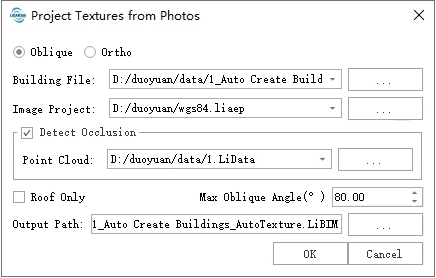
Parameters
- Model:ncludes two modes: Oblique and Ortho. Choose Oblique mode if using image project results for texture mapping, and choose Ortho mode if using an orthophoto.
Oblique Mode
- Building File:The building file (*.LiBIM) to be texture mapped.
- Aerotriangulation projects:The image project file (*.LiAep) used for texture mapping.
- Detect Occlusion: Whether to use a point cloud file for obstruction detection during texture mapping to reduce the likelihood of wall features being obstructed by other objects.
- Point Cloud:The point cloud file (*.LiData) used for occlusion detection.
- Roof Only:Whether to apply texture mapping only to roofs. This option is suitable for image projects that only contain nadir photos.
- Max Oblique Angle:Only use photos with angles between the shooting angle and wall slope less than this value for texture mapping to prevent excessive warping of wall textures.
- Output Path:The path to where the generated texture mapped building file would be saved.
Ortho Mode
- Building File:The building file (*.LiBIM) to be texture mapped..
- DOM:The orthophoto file (*.tiff) used for texture mapping.
- Output Path:The path to where the generated texture mapped building file should be saved.
Ortho mode can only apply texture mapping to roofs.