Calculate Forest Metrics by Grid
Function Overview
Calculate forest parameters for each point cloud data, including gap fraction, Theory Of Canopy Cover, and LAI(leaf area index). Each point cloud dataset will generate a corresponding CSV file or TIFF file.
Usage
Click TLS Forest > Calculate Forest Metrics by Grid
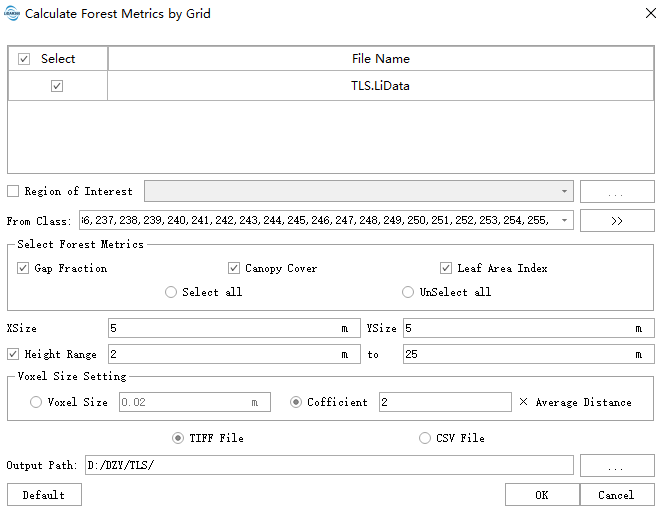
Parameter Settings
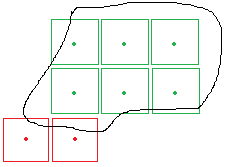
- Region of Interest (Optional): After specifying a region of interest, grids outside this area will not be included in the output. For TIFF results, grids outside the region will be assigned a NODATA value (null). As shown in the figure below, if the black line represents the region of interest, red grids will be assigned NODATA because their centers fall outside the region. Green grids, whose centers are within the region, will be retained. The boundaries of all green grids will be output as a vector file in the results.
- Input Data: Ensure each input point cloud data is normalized. Input files can be individual point cloud data files or point cloud datasets. The data to be processed must be opened in LiDAR360 software.
- Select Forest Parameters: Supports Gap Fraction, Canopy Cover and Leaf Area Index.
- XSize (m) (Default: "5"): Grid size in the X direction.
- YSize (m) (Default: "5"): Grid size in the Y direction.
Height Range (m) (Default: "2 to 25"): Only point clouds with Z-values within this range will participate in the operation. This setting only takes effect when the coverage option is checked.
Voxel Size Setting:
- Voxel Size (m) (Default: "0.02"): Grid size for dividing point clouds into three-dimensional grids within the statistical unit.
- Cofficient (Default: "2"): A coefficient factor used to automatically calculate the 3D grid size within the statistical unit based on the average point spacing of the point cloud.
- Output Path: Output path where each input point cloud data file will generate a corresponding TIFF file, usable as independent variables in regression analysis.