Classify by DL
Function Overview
This function utilizes a deep learning segmentation model to classify point cloud data, suitable for various scenarios including airborne urban areas, airborne rural areas, terrestrial forestry, terrestrial parks, and mobile road surveys. The model is developed based on sparse convolution, ensuring high efficiency while delivering superior detail performance.
Usage
Click Classification > Classify by DL
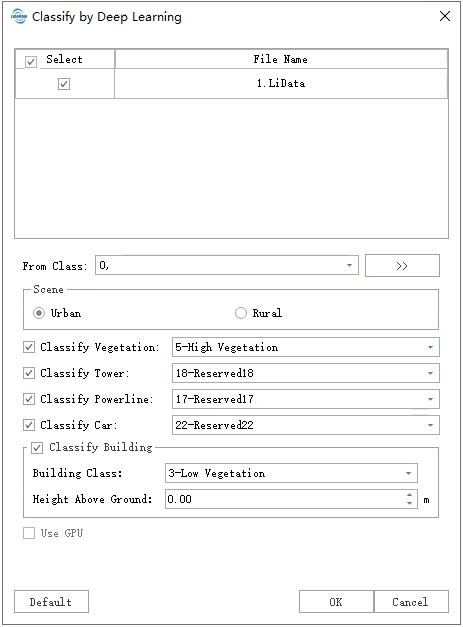
Parameter Settings
- Input Data: Select one or multiple loaded datasets in the software.
From Class: Choose the classes to be classified. Unselected classes will not be overwritten by the model results, which is particularly useful when the data contains some finely categorized classes.
Scene: Selecting different scenarios will utilize different pre-trained models. The software provides five pre-trained models for point cloud classification:
- UAV Urban: supports unclassified, ground points, vegetation, buildings, tower, powerlines, car
- UAV Rural: supports unclassified, ground points, vegetation, buildings, tower, powerlines
- TLS Forest: supports ground points, low vegetation, high vegetation
- TLS Park: supports unclassified, ground points, low vegetation, high vegetation, buildings, powerlines, pole, vehicle, billboard, guardrail
- MLS Road: supports unclassified, ground points, low vegetation, high vegetation, buildings, powerlines, pole, static car, dynamic car, billboard, guardrail
XX Class: Check to enable classification for this category and select the corresponding numerical value.
- Height Above Ground: When checked, uses class 2 (ground points) as reference ground points. Enter the ground height to effectively prevent misclassification of ground points as buildings.
- Use GPU first: Whether to use GPU acceleration for classification. This function supports two operation modes: GPU and CPU. If the computer's GPU meets requirements (NVIDIA GPU with compute capability ≥3.5 and ≥4GB available VRAM during operation), this option will be selected by default. Users can choose whether to use GPU based on their needs. GPU efficiency is approximately 4 times higher than CPU. If conditions are not met, GPU cannot be used, and the function will default to CPU operation.
Note: The output of this function will overwrite the original data files. Users who need to preserve original data should back up their data accordingly. Due to limitations in training data scenarios, the deep learning model may perform suboptimally in certain scenarios or with specific types of data.