DEM Accuracy Analysis
Function Overview
Analyzes the elevation accuracy of digital elevation models using checkpoint method.
Usage
- Click Terrain > DEM Accuracy Analysis to open the DEM accuracy analysis interface:

Click Add DEM File
 , select the digital elevation model file to be analyzed (only .tif format supported);
Click Add Checkpoints
 , add checkpoint file (only .txt format supported);
Click Execute Analysis
 , set parameters to perform accuracy analysis and statistical analysis results (number of checkpoints, number of gross errors, gross error rate, mean error, root mean square error, tolerance);
Click Export Report
 , set relevant information to export accuracy analysis report.
Add DEM File
Add the digital elevation model file to be analyzed. Currently only .tif format files are supported.
Add Checkpoint File
Add checkpoints, which can come from GNSS measurements, photogrammetry, existing results (high-precision or same-precision topographic maps, digital elevation models, etc.) according to requirements. Ensure that the checkpoints and the digital elevation model to be checked are in the same coordinate reference system.
Execute Analysis
Perform accuracy analysis, must be executed after adding DEM file and checkpoint file.
Parameter Settings
- RMSE Formula: Calculation formula for elevation root mean square error.
- Formula 1:
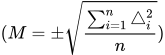
- Formula 2: In the formula, M is the result root mean square error, n is the number of checkpoints,
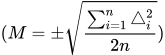
 is the difference.
- Formula 1:
- Tolerance: Error tolerance.
Note: ① Usually, in high-precision detection, 2 times the allowable root mean square error is used as the tolerance, and formula 1 is used to calculate the result root mean square error; in same-precision detection,  times the allowable root mean square error is used as the tolerance, and formula 2 is used to calculate the result root mean square error. Errors within the tolerance range participate in accuracy statistics, errors exceeding the tolerance are considered gross errors. ② After executing the analysis, the analysis status of each digital elevation model file:
  indicates that the digital elevation model error gross error rate is less than 5%,
  indicates that there are no checkpoints within the digital elevation model range,
  indicates that the digital elevation model error gross error rate is greater than 5%.
Reference accuracy indicators for 1:500, 1:1000, 1:2000 digital elevation models are shown in the following figure:
Export Report
Export elevation root mean square error detection report.
Export Information Settings
- Project Name: Project name.
- Scale: Scale.
- Detection Method: Detection method.
- Unit: Unit.
- Instrument Name, Model: Instrument name and model.
- Instrument Number: Instrument number.
- Output Path: Report save path, currently only .html format is supported.