Triangulation Modeling
Summary
Use point clouds for 3D modeling and generate 3D model files in .obj format.
Usage
Click Mine > Triangulation Modeling.
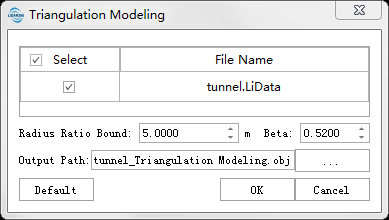
Settings
- Input Data:The input file can be a single point cloud data or a point cloud dataset, which must be opened in the LiDAR360 software. File format: *.LiData.
- Radius Ratio Bound (Default Value is "5"): In the process of triangulation reconstruction, the ratio of the radius of the candidate triangle to the radius of the boundary triangle. The algorithm will detect candidate triangles along the surface of the point cloud. When the point cloud is missing, the radius of the candidate triangle will become larger and it will easily become sharp. This value is used to control whether these triangles are used as candidates. The larger the value, the fewer holes in the model generated and the more shape triangles.
- Angle Threshold Beta (Radians) (Default Value is "0.52"): The threshold of the minimum included angle between the triangle at the boundary and the candidate triangle in the triangulation reconstruction process. The larger the value, the smoother the reconstructed triangulation model, but the algorithm is eaiser to terminate at the point where the point cloud shape changes drastically. This value is recommended to be set between 0.1 and 1.5.