Composite Multispectral Image
Function Overview
Composite Multispectral Image uses feature matching to combine images from different channels collected by a multispectral camera into one multiband image.
Usage
Click Spectrum > Composite Multispectral Image.
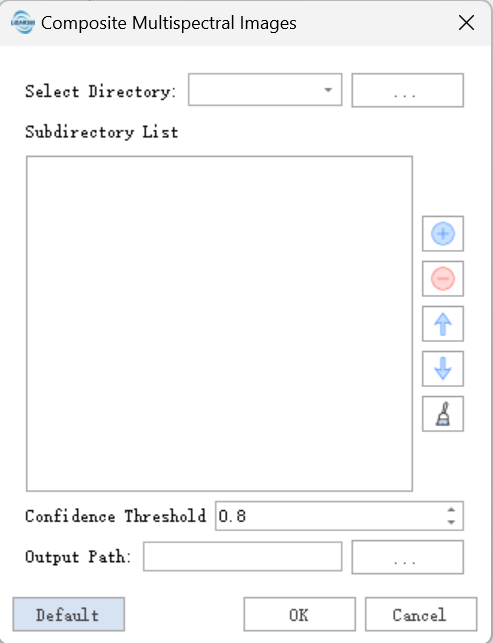
Parameter Settings
Select Directory: Select the directory where multispectral images are stored. After the directory is added, subdirectories corresponding to each channel are loaded automatically.
Subdirectory List: Folder paths corresponding to each image channel. Images in the first folder are used as reference images, and images in the other folders are registered to the reference images.
Confidence Threshold: Sets the feature ratio or ECC correlation coefficient threshold that satisfies homography transformation. The algorithm uses homography transformation by default. If it fails, ECC correlation registration is attempted. If registration still fails, lower the confidence threshold and check the registration result.
Output Path: Output result folder.
Notes
- This function is designed for multispectral devices from Digital Green Earth. It assumes that the captured scene approximately satisfies homography transformation. Images collected by other devices may not be composited normally.
- Images in each channel should be single-band images. The image names in each channel should be consistent. For example, channel 1 image
1.tif, channel 2 image1.tif, channel 3 image1.tif, channel 4 image1.tif, and channel 5 image1.tifare composited into the 5-band image1.tif. - The function first calculates transformation parameters that meet the confidence threshold and then applies them to all images. The first image group that satisfies the threshold determines the registration quality of all images. If the actual image quality is poor, collect several groups of images with good lighting and approximately flat scenes and place them in the corresponding channel folders.