Calculate Forest Metrics by Polygon
Functional Overview
Calculates forest parameters for point cloud data within a polygon range, including Gap Fraction, Canopy Cover, and Leaf Area Index; a single CSV file will be generated.
Usage
Click TLS Forestry > Calculate Forest Metrics by Polygon
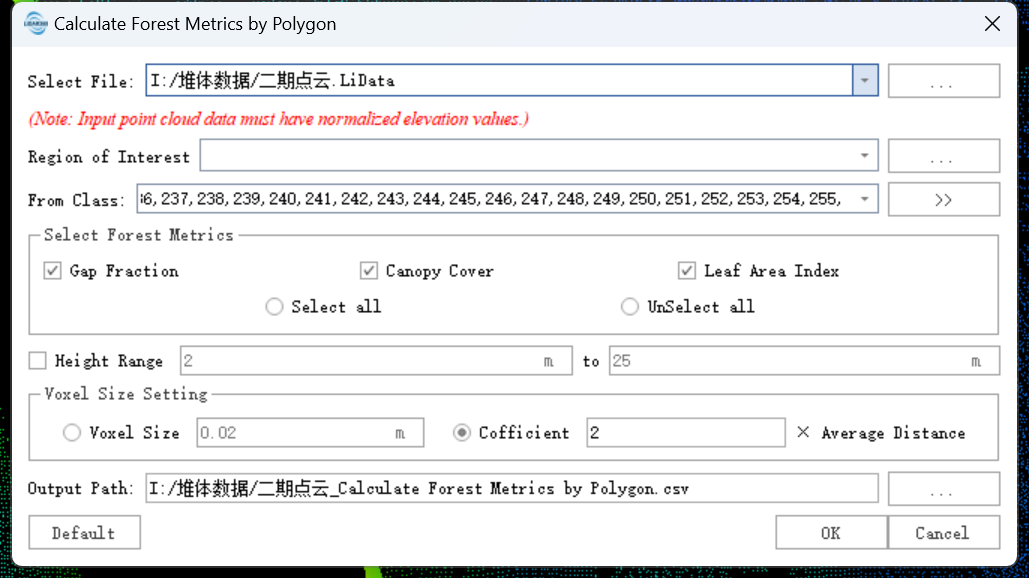
Parameter Settings
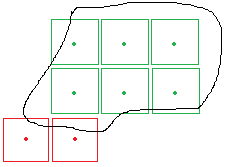
- Range of Interest (Required): Grids with centers outside the ROI will not be calculated; as shown below, red grids are excluded while green grids are included.
- Input Data: Ensure every input point cloud is Normalized; the input can be a single file or a dataset, and must be opened in LiDAR360.
- Select Forest Metrics: Supports Gap Fraction, Canopy Closure, and Leaf Area Index.
- Height Range (m) (Unchecked by default, 2m to 25m): Only point clouds within this Z-value range participate in the calculation; only takes effect when Canopy Cover is checked.
- Grid Size Settings:
- Grid Size (m) (Default "0.25"): The size of the 3D grid used to divide the point cloud within the statistical unit.
- Factor (Default "2"): A factor to automatically calculate the 3D grid size based on average point spacing (Grid Size = Factor * Average Point Spacing).
- Output Path: The output directory; a CSV file containing point cloud locations, names, and calculated metrics will be generated.