Point Cloud-based Distress Detection (Processing Pipeline)
Function Description: Integrates point cloud-based distress detection, PCI calculation, and report export pipeline, enabling one-click processing for point cloud-based distress detection.
Input and Output
Data Input
Lane Line: Different from the interactive selection mode in normal operations, here all vector lines within the "LaneLine" layer are used as input by default. Therefore, the lane line must be placed in the "LaneLine" layer in advance, while avoiding unrelated vector lines in this layer.
Point Cloud Data: Import all point clouds of the current project. The input point clouds can be unclassified, since a classification step is already integrated in the pipeline.
Result Output
- Report: By default, output to Current Project/Pavement Distress Analysis/PavementDistressAnalysis.html
Steps
1.Click Processing Pipeline → Point Cloud-based Distress Detection. The corresponding pipeline model will be automatically loaded, as shown below:
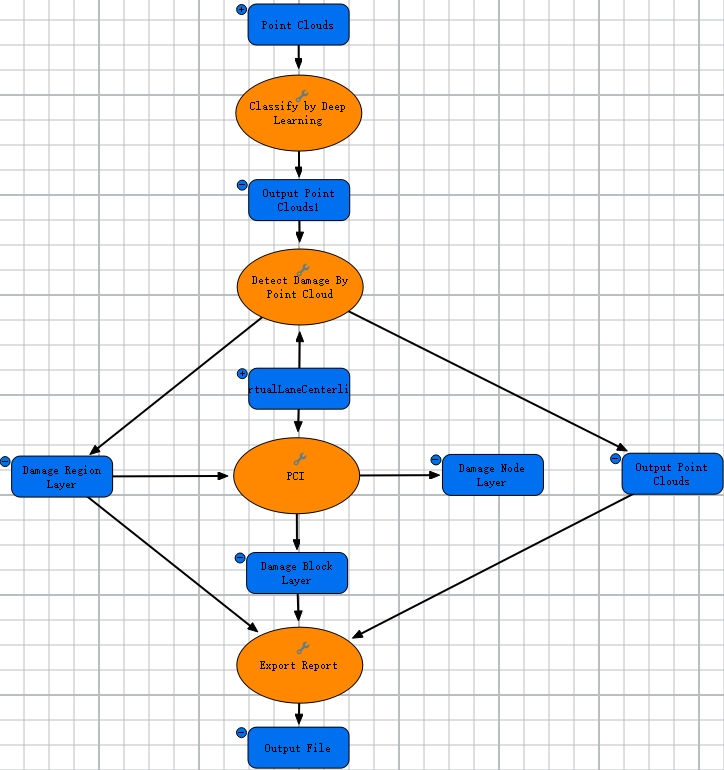
Point Cloud-based Distress Detection Pipeline
2.If the pipeline fails to run due to incorrect input data or if custom parameter adjustment is needed, you may modify the input data or step parameters. Refer to Add and connect data and tools, and modify elements.
3.Ensure the pipeline is in a runnable state before proceeding. This pipeline supports distributed processing, with two execution modes: Run and Distributed Run (only Deep Learning Classification and Point Cloud-based Distress Detection support distributed processing, other steps do not). For differences between non-distributed and distributed runs, refer to Run and stop a model.