PCI
Steps
After obtaining distress areas through Distress Detection and Distress Editor, click PCI
 to open the following dialog box: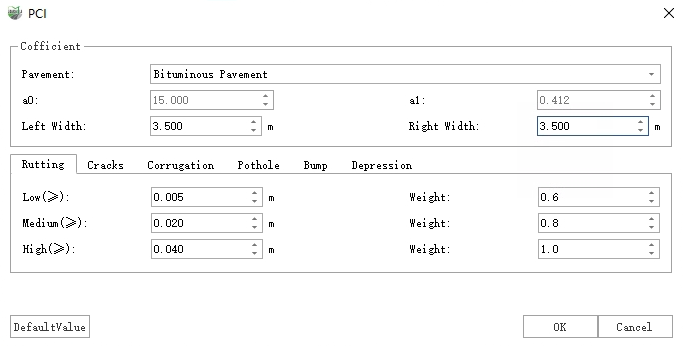
PCI
Select the road line vector to be calculated, complete the parameter settings, and click OK to perform the PCI calculation.
The results are output in two forms: Sample Unit and Sample Node, which are stored in the "Sample Unit" and "Sample Node" layers respectively.
Sample Unit: Standard units for the distress detection area, with a unit area of 225 square meters (the last unit has no area limit). Records information such as the unit's ID, PCI value, Rating, area, Fill Volume, and Cut Volume.
Sample Node: The center point of a sample unit, corresponding one-to-one with the sample units. It records the unit's PCI value and Rating information, consistent with the corresponding sample unit.
Parameter Settings
Road Line: Defines the area involved in sample unit generation and PCI calculation.
Sample Unit Area: Defines the area of a sample unit; the standard is 225 square meters.
Flip Direction: By default, sample units are numbered from the start to the end of the road line. When checked, they are numbered from the end to the start.
Lane Width: The width of a single lane.
Left Lane Number: The number of lanes to the left of the road line.
Right Lane Number: The number of lanes to the right of the road line.
Note: Lane-related parameters should remain consistent with those in Point Cloud-based Distress Detection.
Severity Threshold: Defines the severity thresholds for different distress types. The default values follow the ASTM D6433-07 standard. Note the following three points:
Only the severity levels of the seven listed distress types will be updated here.
Distresses generated via Distress Editor have their severity levels manually specified and will not be updated here.
PCI Calculation Process
Based on the ASTM D6433-07 standard for PCI calculation of asphalt pavements.
Divide the target area into several sample units according to the set unit area (default area is 225 square meters). The following steps calculate the PCI value for each sample unit.
Sum up the total quantity of each distress type at each severity level in the current sample unit. Depending on the distress type, three quantity statistical types are distinguished: occurrences, linear, and area, with units being: number, feet (meters), and square feet (square meters), respectively. The specific types are as follows:
Occurrences: Potholes.
Linear: Bumps, Edge Cracking, Joint Reflection Cracking, Lane/Shoulder Drop-off, Longitudinal Cracking, Transverse Cracking.
Area: Alligator Cracking, Bleeding, Block Cracking, Corrugation, Depressions, Patching, Polished Aggregate, Railroad Crossing, Rutting, Shoving, Slippage Cracking, Swell, Weathering/Raveling.
Divide the total quantity of each distress type and severity level by the sample unit area and multiply by 100 to obtain the percent density of each distress type and severity.
Determine the individual deduct value (DV) based on the distress type, severity level, and percent density using the Deduct Value Curves.
Determine the Maximum Corrected Deduct Value (CDV). If none or only one individual deduct value is greater than 2.0, the sum of all DVs is used as the maximum CDV; otherwise, determine the maximum CDV according to the following steps:
5.1. List the individual deduct values in descending order.
5.2. Determine the allowable number of deducts m using the following formula: m = 1 + (9/98)(100 - HDV), where HDV is the highest DV value. If m contains a decimal part f, first round m up to the nearest integer, then multiply the m-th DV value by f to obtain the new DV item.
5.3. First calculate the sum of the first m deduct values (TDV), then iterate through the first m deduct items to count the number of deduct values q that are greater than 2.0. Determine the CDV value based on TDV and q using the TDV Correction Curves.
5.4. Set the last deduct value among the first m items that is greater than 2.0 to 0, and recalculate CDV according to 5.3.
5.5. Repeat step 5.4. for multiple iterations until only one deduct value among the m items remains greater than 2.0. Stop the iteration and record the maximum CDV found during the process as the final CDV value.
The PCI of the current sample unit = 100 - CDV.