## Generating elevation annotations ##

### Summary ###

Using point cloud and contour lines to generate elevation points for topographic mapping.[Notes Elevation Points File](../../Appendix/NoteElevationPointsFile.md).

### Usage ###

Click *Terrain > Generating elevation annotation*.

<p></p>
<div align=center>
<img src="../../ScreenShot/en/Terrain/GenerateElevationAnnotation.png" alt="LiDAR360 Terrain Generating elevation annotation" width="480" style='margin-left:0%'/>
<p style='text-align:center'></p>
</div>

### Settings ###

- **Input Tiff File**: Input DEM file format in LiData.
- **Input Contour File (.shp)**: Input Contour file format in shp，The file needs to contain one or more contours. 
- **Radius (m)(default value is "15")**: A Note Elevation Point is generated within a region with a defined radius.  
- **Output path**: The path of the generated contour lines file(s) to save.
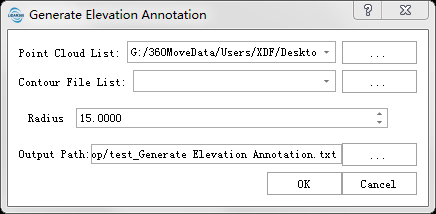
- **Point Cloud**: The input file is a single point cloud data file.
- **Contour File**: Input contour file in SHP format, which should contain one or multiple contour lines.

- **Sampling Method**: Includes Circle, grid, and diamond sampling methods.
- **Sampling Distance**: The distance between adjacent sampled annotation points.
- **Conflicting Notes**: Method for handling conflicting annotation points.
Keep: retains originally sampled elevation annotation points; 
Modify: adjusts conflicting annotation point elevations based on adjacent contour lines; 
Delete: removes conflicting annotation points.
- **Output Path**: The output path for elevation annotation points (only valid when contour lines are in SHP format).