## Convert Projection Surface ##
### Functional Overview ###
For Gauss projection and UTM projection, the length deformation value will increase when the projection area is far away from the central longitude of the projection belt. Convert Projection Surface function **can be used to reduce length deformation**.
### Usage ###
Click *Data Management > Projection and Coordinate Conversion > Convert Projection Surface*
### Steps ###
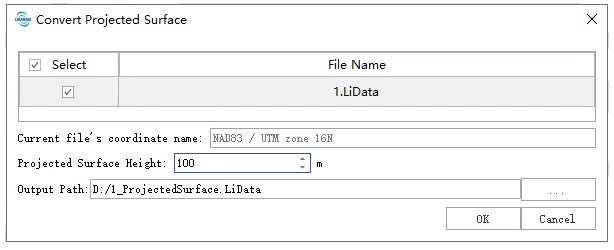
1. **Input point cloud data**: The input file with projection information can be a single point cloud data file or multiple data files. File format: *.LiData. Click the point cloud file to display the coordinate system of the point cloud on the interface.
> Only point cloud files whose horizontal coordinate system is Gauss projection or UTM projection are supported.
2. Set **projection surface height**: Set the elevation of the projection. The positive value is the distance above the ellipsoid and the negative value is the distance below the ellipsoid, the unit is in meters.
3. **Output Path**: Output folder path, after the algorithm is executed to generate a new file after coordinate conversion.
### Principle ###
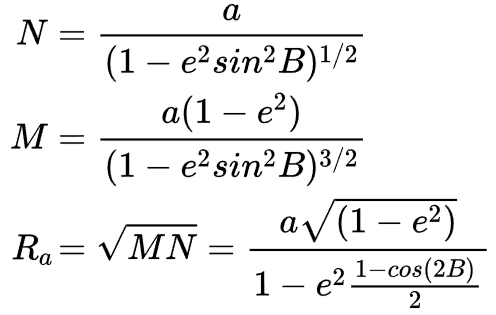
1. Calculate the radius of curvature of the earth Ra where the point cloud is located. Where a is the semi-major axis of the ellipsoid, e is the eccentricity of the ellipsoid, and B is the average latitude of the measurement area of the point cloud.
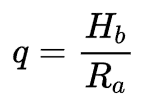
2. Calculate the scale factor q. In the formula, Hb is set as the elevation parameter of the projection.
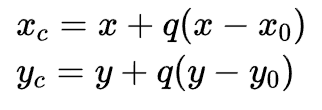
3. Calculate the modified coordinates, where Xc and Yc are the modified coordinates, X and Y are the original coordinates, and X0 and Y0 are the projection center coordinates of the coordinate system.