## Tile by Point Number ##
### Summary ###
**Tile by Point Number** divides the point cloud into a series of small data files with a total of user-defined number of points. This process begins from the lower-left corner of the input file's bounding box. The output of this function is similar to [Tile by Range](TilebyRange.md).
### Principle ###
The **Point Number** entered by the user will be recalculated according to the actual number of blocks in the actual chunking process. The formula is as follows:
Among them,  is the number of tiles,
  is the actual point number of a tile,
  is the total number of points in the original file, and
 is the user-defined point number.
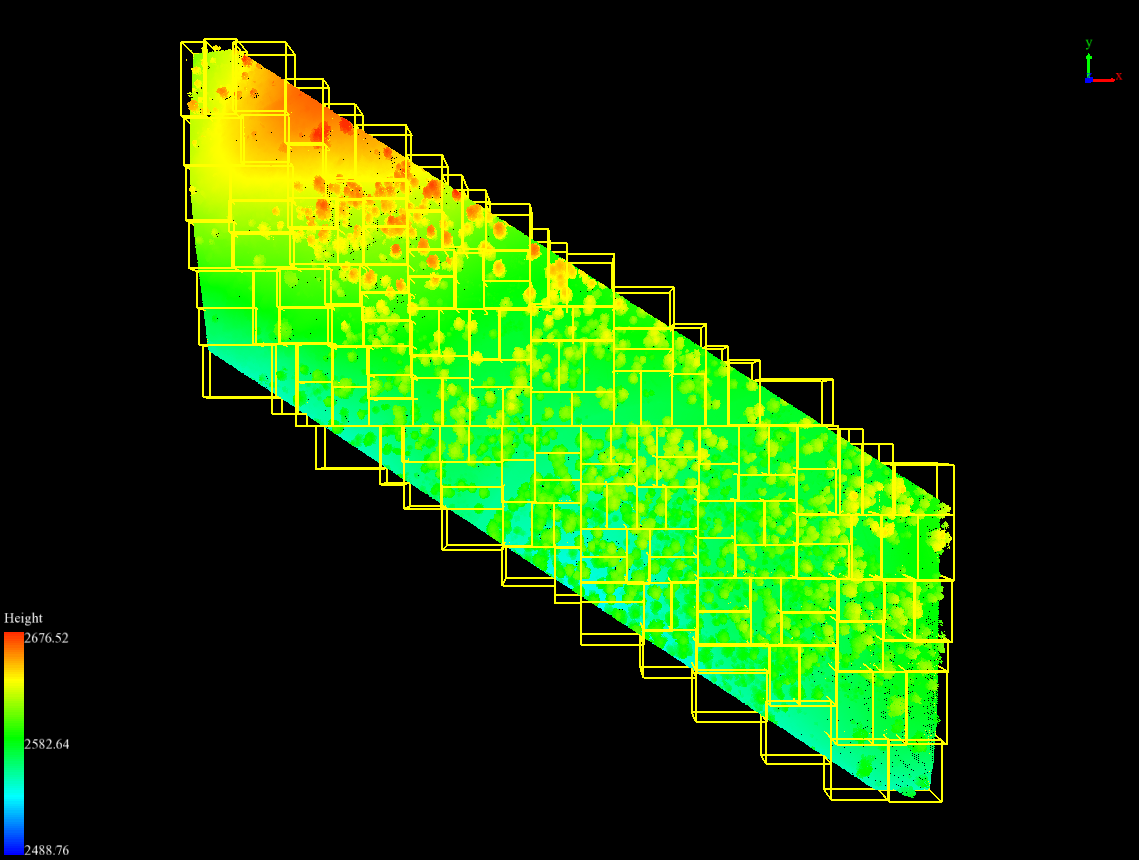
Original point cloud data and point cloud data after chunking by point (different yellow bounding boxes represent different point cloud data).
### Usage ###
Click *Data Management > Point Cloud Tools > Tile by Point Number*
### Settings ###
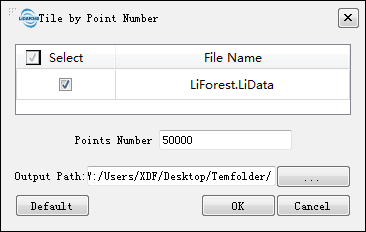
- **Input Data**: The input file can be a single point cloud data file or multiple data files. File Format: *.LiData.
- **Point Number (default value is "50000")**: Set the number of points in each tile. Note that the actual number of points in a tile may be slightly different from the user-defined number.
- **Output path**: Path of the output folder. After the function being executed, new files will be generated.
is the user-defined point number.
Original point cloud data and point cloud data after chunking by point (different yellow bounding boxes represent different point cloud data).
### Usage ###
Click *Data Management > Point Cloud Tools > Tile by Point Number*
### Settings ###
- **Input Data**: The input file can be a single point cloud data file or multiple data files. File Format: *.LiData.
- **Point Number (default value is "50000")**: Set the number of points in each tile. Note that the actual number of points in a tile may be slightly different from the user-defined number.
- **Output path**: Path of the output folder. After the function being executed, new files will be generated.