## Raster Subdivision ##
### Summary ###
The raster subdivision tool is the inverse operation of [Raster Mosaic](RasterMosaic.md). The frame number adapts the coordinate number and consists of the southwest corner of the frame (Y coordinate + X coordinate). A scale of 1:5000 is taken into 1 km, 1:2000 and 1:1000 to 0.1 km, and 1:500 to 0.01 km.
### Usage ###
Click *Data Management > Raster Tools > Raster Subdivision*
### Settings ###
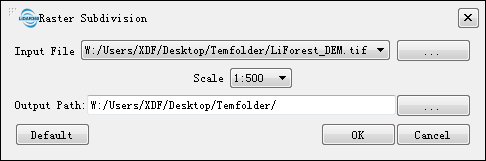
- **Input File**: Users can select the file to be processed from the drop-down list.
- ** **: Users can add external files that need to be processed.
- **Scale (default "1:500")**: Users can select a targeted scale. LiDAR360 has four scale options: 1:500, 1:1000, 1:2000, and 1:5000.
- **Output path**: Path of the output folder. After the function is executed, new subdivided files will be generated.
**: Users can add external files that need to be processed.
- **Scale (default "1:500")**: Users can select a targeted scale. LiDAR360 has four scale options: 1:500, 1:1000, 1:2000, and 1:5000.
- **Output path**: Path of the output folder. After the function is executed, new subdivided files will be generated.