## Raster Mosaic ##
### Summary ###
**Raster Mosaic** refers to the technical process of merging two or more images to one image. LiDAR360 provides seven sampling methods: **Nearest Neighbour**, **Bilinear**, **Cubic**, **CubicSpline**, **Lanczos**, **Average**, and **Mode**. It is the reverse operation of [Raster Subdivision](RasterSubdivision.md).
### Usage ###
Click *Data Management > Raster Tools > Raster Mosaic*
### Settings ###
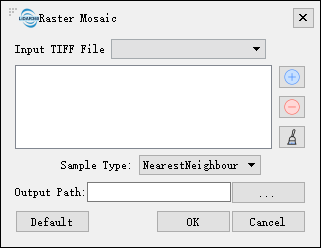
- **Input Tiff File**: Users can select multiple files (>1) to be processed from the drop-down list.
- ** **: Users can add multiple external images for image mosaic.
- **
**: Users can add multiple external images for image mosaic.
- ** **: Users can select a file in the list and click this button to remove the file from the list.
- **
**: Users can select a file in the list and click this button to remove the file from the list.
- ** **: Click this button to clear all images in the list.
- **Sample Type**: Users need to select the sampling type from the drop-down list.
- **NearestNeighbour (default)**: Nearest neighbor, sampled from the nearest neighbor.
- **Bilinear**: Bilinear sampling (2 x 2 cores).
- **Cubic**: Cubic convolution approximation (4 x 4 kernels).
- **CubicSpline**: Cubic B-spline approximation (4×4 kernel).
- **Lanczos**: Lanczos Window Sine Interpolation (6×6 Cores). Lanczos can be used as a low pass filter or to smoothly interpolate the value of a digital signal between its samples.
- **Average**: Calculate the average of all non-value pixels.
- **Mode**: Select the most frequently occurring value for all sampling points.
- **Output path**: Path of the output folder. After the function is executed, a new file will be generated.
**: Click this button to clear all images in the list.
- **Sample Type**: Users need to select the sampling type from the drop-down list.
- **NearestNeighbour (default)**: Nearest neighbor, sampled from the nearest neighbor.
- **Bilinear**: Bilinear sampling (2 x 2 cores).
- **Cubic**: Cubic convolution approximation (4 x 4 kernels).
- **CubicSpline**: Cubic B-spline approximation (4×4 kernel).
- **Lanczos**: Lanczos Window Sine Interpolation (6×6 Cores). Lanczos can be used as a low pass filter or to smoothly interpolate the value of a digital signal between its samples.
- **Average**: Calculate the average of all non-value pixels.
- **Mode**: Select the most frequently occurring value for all sampling points.
- **Output path**: Path of the output folder. After the function is executed, a new file will be generated.