## Convert to Texture LiModel ##
### Summary ###
Convert to Textured LiModel tool is based on the [Convert Image to LiModel](ConvertImagetoLiModel.md) tool, which maps color values of a DOM data to the LiModel model for display. This function only supports single file data conversion.
### Usage ###
Click *Data Management > Conversion > Convert to Texture LiModel*
### Settings ###
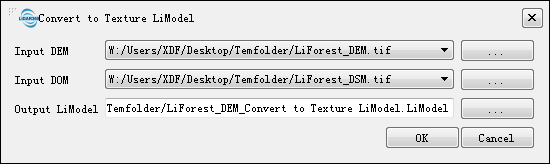
- **Input DEM**: Users can select a file to be converted from the drop-down list or use the button  to load an external data file. Single-band raster data is required.
- **Input DOM**: Users can select a desired file from the drop-down list or use the button to load an external data file. The selected color image needs to have at least three bands.
- **Output LiModel**: Path of the output file. After the conversion being executed, the converted new file will be generated.
to load an external data file. Single-band raster data is required.
- **Input DOM**: Users can select a desired file from the drop-down list or use the button to load an external data file. The selected color image needs to have at least three bands.
- **Output LiModel**: Path of the output file. After the conversion being executed, the converted new file will be generated.