## Convert TIFF to ASCII ##
### Summary ###
Convert TIFF to ASCII tool can be used to convert TIFF format raster images to files in ASCII format.
### Usage ###
Click *Data Management > Conversion > Convert TIFF to ASCII*
### Settings ###
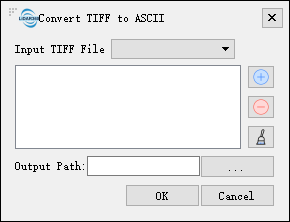
- **Input Tiff File**: Users can select the file to be processed from the drop-down list.
- ** **: Users can add external file(s) to be converted.
- **
**: Users can add external file(s) to be converted.
- ** **: Users can select one or files in the list and click this button to remove them from the list.
- **
**: Users can select one or files in the list and click this button to remove them from the list.
- ** **: Click this button to clear all files in the list.
- **Output path**: Path of the output folder. After the conversion being executed, the converted new file(s) will be generated.
**: Click this button to clear all files in the list.
- **Output path**: Path of the output folder. After the conversion being executed, the converted new file(s) will be generated.