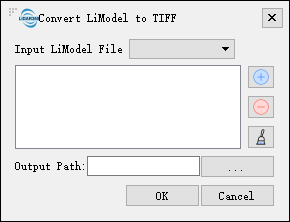
## Convert LiModel to TIFF ##
### Summary ###
Convert LiModel to TIFF tool converts LiModel format files to raster images in TIFF format. After [editing](../../Terrain/limodeleditor.md) LiModel data, users can use this function to convert the data to TIFF format.
### Usage ###
Click *Data Management > Conversion > Convert LiModel to TIFF*
### Settings ###
- **Input LiModel File**: User can select a file to be processed from the drop-down list.
- ** **: Users can add external data files to be converted.
- **
**: Users can add external data files to be converted.
- ** **: Users can select a file in the list and click this button to remove the file from the list.
- **
**: Users can select a file in the list and click this button to remove the file from the list.
- ** **: Click this button to clear all the data in the list.
- **Output path**: Path of the output folder. After the conversion being executed, the converted new file will be generated.
**: Click this button to clear all the data in the list.
- **Output path**: Path of the output folder. After the conversion being executed, the converted new file will be generated.