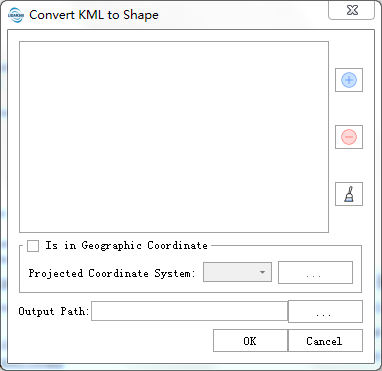
## Convert KML to Shape ##
The data in KML format will be converted to shape format.
KML format reference:[https://wiki.openstreetmap.org/wiki/KML](https://wiki.openstreetmap.org/wiki/KML)
### Usage ###
Click *Data Management > Conversion > Convert KML to Shape*.
### Settings ###
- **Input KML File**: Users can select the files need to be processed from the drop-down list. The files will be added to the list of files to be processed.
- ** **:Users can insert external files to be processed.
- **
**:Users can insert external files to be processed.
- ** **:Users can select one file in the list of files to be processed, and click this button to remove this file from that list.
- **
**:Users can select one file in the list of files to be processed, and click this button to remove this file from that list.
- ** **:Click this button to clear the list of files to be processed.
- **Under Geographic Coordinate System**: Check this option to convert the geographic coordinates in the kml file to projected coordinates during export to shp. For the selection of projected coordinate system, refer to [Define Projection](../Transform/DefineProjection.md)
- **Output Path**:Path of output folder. After the function is executed, the converted Shape file is generated.
**:Click this button to clear the list of files to be processed.
- **Under Geographic Coordinate System**: Check this option to convert the geographic coordinates in the kml file to projected coordinates during export to shp. For the selection of projected coordinate system, refer to [Define Projection](../Transform/DefineProjection.md)
- **Output Path**:Path of output folder. After the function is executed, the converted Shape file is generated.