## Convert LiBIM to OBJ ##
Convert LiBIM format data into standard 3D model file in .obj format.
### Usage ###
Click *Data Management > 3D Building Tools > Convert LiBIM to OBJ*.
### Parameters ###
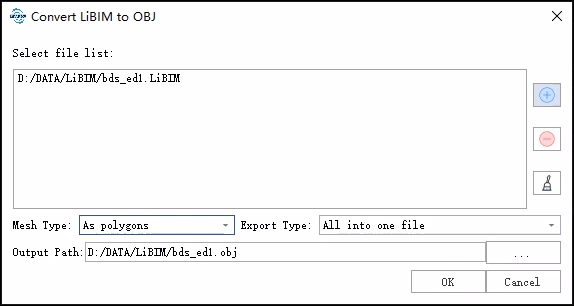
- **File list**: Input LiBIM files to be converted.
Users need to click the button to add the file data to be converted from outside; Users can select a file in the list and click
  button to remove the file from the list.
Click
button to remove the file from the list.
Click button to clear all the data in the list.
- **Mesh Type**: Choose between polygons and triangles.
- **Export Type**: Choose to export all building models as a single file, or export each building model as a separate file.
- **Output path**: Select the path of the output file directory. After the algorithm is executed, the corresponding obj file is generated.
button to clear all the data in the list.
- **Mesh Type**: Choose between polygons and triangles.
- **Export Type**: Choose to export all building models as a single file, or export each building model as a separate file.
- **Output path**: Select the path of the output file directory. After the algorithm is executed, the corresponding obj file is generated.